IDP vs OCR: The Difference and Which One You Need
IDP vs OCR explained: OCR turns images into text, IDP turns documents into checked data. See one invoice read both ways, and how to choose.
Quick answer
OCR (optical character recognition) turns an image of text into machine-readable text. IDP (intelligent document processing) uses OCR as one step, then works out what the document is, pulls out named fields such as the invoice number and total, checks them against rules and sends clean data into your system. OCR reads the text; IDP understands the document.
Why listen to us: ECIT Digital runs IDP for finance, insurance and property teams every day. Our AI reads the document, our team checks every field the AI is unsure about, and on invoices we guarantee 99.8% accuracy.
Confession: the first OCR app I ever used, I pointed at my grandmother's handwritten cake recipe. It read "1 cup sugar" as "1 cup cigar" [the cake was never made, which in hindsight was the right call].
It got almost every letter right and still produced a recipe nobody should eat. That, more or less, is the whole IDP vs OCR question, and this post walks through it with fewer cigars. It is part of our guide to document process automation, if you want the bigger picture [and a second cup of coffee].
IDP vs OCR at a glance
Here is the short version, for anyone with a vendor call in ten minutes [hello, I see your calendar].
| OCR | IDP | |
|---|---|---|
| What it does | Turns an image of text into text | Turns a document into checked, structured data |
| What you get back | Lines and words, with positions | Named fields and line items, such as supplier, date and total |
| Knows what the document is | No | Yes: invoice, order, claim, contract |
| Checks the data | No | Yes: rules, plus a person for unsure fields |
| Copes with new layouts | Reads the text, but cannot tell which number is which | Finds fields by meaning, not by position |
| Where the data goes | A text file or searchable PDF | Your ERP, AP tool or other system |
| Typical use | Searchable archives | Invoices, orders, claims and other documents that feed a system |
What OCR does
OCR, optical character recognition, looks at pixels and works out which letters they are. That is the whole job, and it is harder than it sounds [ask anyone who has read my grandmother's handwriting].
Microsoft describes its own Read OCR model plainly: it extracts print and handwritten style text as lines and words, with the position of each word and a confidence score. Notice what is missing from that list: anything about what the words mean [OCR does not do meaning; it barely does small talk].
Image quality matters a lot. The guide for Tesseract, the best-known open-source OCR engine, says it works best on images which have a DPI of at least 300 dpi. So the phone photo of an invoice taken on a car dashboard starts the race with its shoelaces tied together.
Our what is OCR guide covers the history. For this comparison, one sentence will do: OCR gives you text, not answers [the answers are your problem, and possibly your Friday].
What IDP adds on top
IDP, intelligent document processing, starts where OCR stops. It still reads the text, usually with OCR inside, and then does the jobs a person used to do with a highlighter and a long sigh.
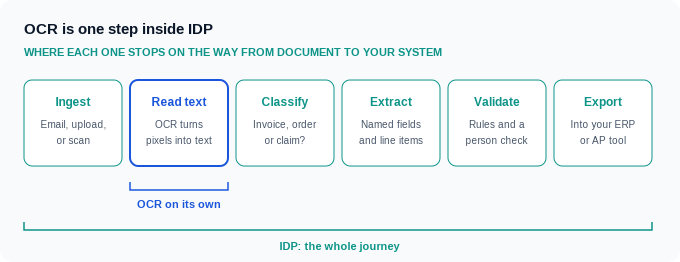
The big cloud vendors draw the same line. Google sorts its Document AI processors into groups, and "Digitize: OCR" is only one of them, next to separate groups for extracting and classifying. Microsoft's invoice model uses OCR capabilities to analyze and extract key fields and line items, which is a very corporate way of saying OCR is the eyes, not the brain.
So IDP vs OCR is not really a fight between rivals. IDP contains OCR, the way a sandwich contains bread [I am not proud of that one, but I am hungry]. Our what is IDP guide explains each step in more detail.
The same invoice, two outputs
Here is the difference on one made-up invoice. Same document, two very different afternoons.
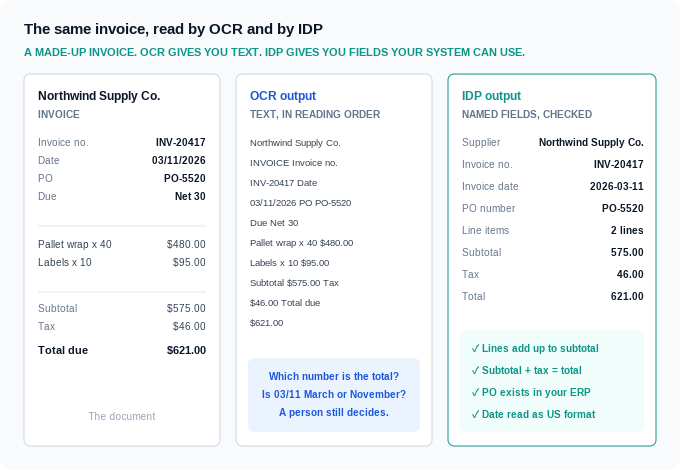
OCR read every character correctly, and you still cannot post that invoice to your ERP. The software does not know that $621.00 is the total, or that 03/11 means March 11 in the US and November 3 in most of Europe [an eight-month disagreement that someone in accounts payable will have to settle by hand].
IDP returns the same facts as named fields, checks the math and looks up the PO. That is the step that removes the retyping, which was the reason anyone bought software in the first place. My grandmother's recipe would have failed its "is this an ingredient" check in about a second [a check I now wish my phone had].
For the full list of fields worth pulling from an invoice, see our guide to invoice data extraction.
IDP, done for you
ECIT Digital runs the whole IDP process: our AI reads the document, our team checks every field the AI is unsure about, and clean data goes into your ERP or AP tool. You pay per document, with no license. See our invoice scanning software.
When OCR alone is enough
OCR on its own is a perfectly good tool, and some IDP vendors would rather you did not know that [sorry, colleagues]. If all you need is the text, buy the text.
| The job | OCR alone? | Why |
|---|---|---|
| Make scanned archives searchable | Yes | You need to find words, not fields |
| Copy a quote out of a scanned letter | Yes | A person picks the bit they need |
| A handful of documents a month from one sender | Often | Someone can copy the fields across in minutes |
| Post supplier invoices into an ERP | No | Needs named fields, line items and checks |
| Process claims or orders at volume | No | Needs classification and validation |
| Feed another system automatically | No | Systems need fields, not paragraphs |
The test is simple. If the question is "where does it say that", OCR is enough. If the question is "what is the total, and is it right", you need IDP [and you were going to keep reading anyway, I can tell].
The clearest sign you have outgrown OCR is a person retyping text from a PDF into another system. That is OCR plus manual data entry, which is the most expensive way to automate anything [automation with extra steps, and the extra steps draw a salary]. Our guide to data entry automation covers how to get rid of that step.
Where both still go wrong
Neither one is magic, and anyone who says otherwise has a quote to send you [and a very confident robot on slide three].
OCR fails loudly: a blurry scan gives you garbled text you can see. IDP can fail quietly, by putting a wrong value in exactly the right field. NIST, the US standards body, describes this kind of AI output as "confidently stated but erroneous or false content", which is a polite way of saying it can be wrong with a completely straight face.
| Problem | What OCR does | What good IDP does |
|---|---|---|
| Blurry or low-resolution scan | Returns garbled text | Scores the field low and sends it for a check |
| Handwriting | Often misreads it | Flags unsure fields for a person |
| A supplier changes its layout | Still reads the text | Finds the fields by meaning |
| A wrong value that looks right | Cannot tell | Catches it with rules or a person check |
That is why serious IDP adds validation rules and a person who checks the fields the AI is unsure about. On invoices we guarantee 99.8% accuracy because our team checks those fields, not because the AI promised to behave [it promised; so did my recipe app].
How OCR and IDP are priced
OCR is cheap, and Tesseract is free. The cost turns up later, in the hours someone spends turning that text into data [the hidden fee is your Tuesday afternoon].
That time is real money. Ardent Partners puts the average cost to process one invoice at $9.90, against $2.67 for the best teams.
IDP is usually priced per page or per document, often with a license on top. We charge per document with no license, and extra fields or features cost extra [the least funny sentence in this post, and the one your CFO will read twice]. If you are comparing tools, our comparison of OCR software for invoices lists the main options.
How to choose: five questions
Answer these five honestly, ideally before the vendor demo starts [the demo always uses the cleanest invoice ever printed].
| Question | If yes |
|---|---|
| 1. Do you only need to search or read the text? | OCR is enough |
| 2. Does the data have to go into another system? | IDP |
| 3. Do documents come from many senders in many layouts? | IDP |
| 4. Do you need line items, not just totals? | IDP |
| 5. Would a wrong number cost you money? | IDP with a person check |
One yes from questions 2 to 5 is usually enough to rule out OCR on its own. If you still cannot decide, count the hours your team spends retyping each week [then try not to cry into the keyboard].
What we see in the field
From inside the pipeline, the IDP vs OCR debate is mostly settled by what happens after the scan [spoiler: someone typing].

- Most teams already own OCR. It sits in their scanner, PDF reader or ERP. The retyping happens after it.
- Every format arrives at once. E-invoices, PDFs, phone photos and paper land in the same flow. Paper is scanned by our partners first.
- Clients never touch the document. They get clean data in their ERP or AP tool, delivered by API, and our team handles the setup.
- A person checks what the AI is unsure about. That is how the 99.8% accuracy guarantee on invoices holds.
Want to see how your invoice process scores today? Run the free invoice health check: it scores your invoice process in about 3 minutes and estimates what you could save, based on your own numbers.
More than OCR
Documents in, checked data out, 99.8% accuracy on invoices
Our AI reads the document, our team checks what the AI is unsure about, and clean data goes into your ERP or AP tool. You pay per document, with no license.
So: OCR reads the text, IDP understands the document, and a person checks what matters. My grandmother, for the record, still bakes that cake from memory [no cigars, no OCR, no complaints].
Sondre Bratlandsmo
November 27, 2026
Book free live demo
Learn how the ECIT Digital solutions can help you with the help from one of our experts.


Frequently asked questions
OCR turns an image of text into machine-readable text. IDP uses OCR as one step, then identifies the document type, extracts named fields such as the invoice number, date and total, checks them against rules and sends the data into another system. OCR gives you text; IDP gives you checked, structured data.
It depends on the job. OCR is enough when you only need to search or read the text, such as making a scanned archive searchable. IDP is the better fit when the data has to go into an ERP or another system, when documents come in many layouts, or when a wrong number would cost money.
Yes. Most IDP tools use OCR to read the text from scanned or image-based documents, then add classification, field extraction, validation and export on top. Digital documents that already contain text can skip the OCR step.
OCR is enough when people only need to find or read text, such as searching scanned archives, or when volumes are so low that someone can copy the few fields they need by hand. Once a person is retyping text from PDFs into another system, you need IDP.
Most modern OCR engines read printed and handwritten text, and IDP builds on that. Handwriting is harder to read than print, so handwritten fields are more often scored as unsure and sent to a person to check before the data is used.
OCR is cheap, and some engines such as Tesseract are free and open source. IDP is usually priced per page or per document, often with a license. ECIT Digital charges per document with no license, with extra cost for additional fields or features.
Relevant articles
Legal Document Data Extraction: What to Pull From Contracts and How
Duplicate Invoices: How They Slip In and How to Detect Them