Data Entry Automation: 4 Methods and How to Start
Data entry automation explained: the 4 methods and which fits your data, what to automate first, what still needs a person, and what to ask before you buy.
Quick answer
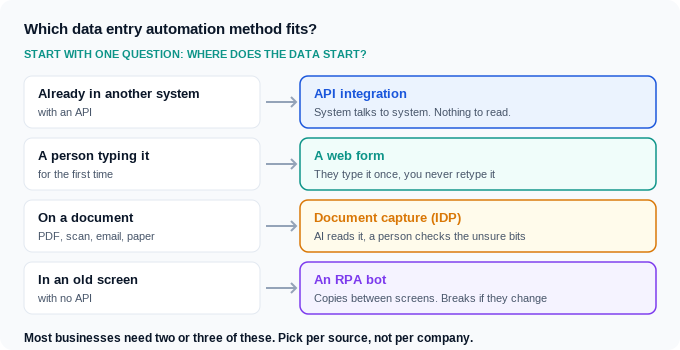
Data entry automation is using software to get information into your business systems without someone typing it. There are four main methods, and the right one depends on where the data starts: an API integration when it already sits in another system, a web form when a person types it for the first time, document capture (OCR and intelligent document processing) when it is on a PDF, scan or email, and an RPA bot when it is stuck in an old screen with no API. Exceptions and unclear documents still need a person to check them.
Why listen to us: ECIT Digital turns invoices, orders and other business documents into checked data for companies every day, and delivers it into their ERP and AP systems.
I was once the data entry automation. One summer I retyped about four thousand delivery notes into a spreadsheet, and my left index finger has not forgiven me [it still twitches when it sees a fax machine].
So this guide is personal. You will see the four ways to stop people retyping things, which one fits your data, what to automate first, what still needs a human, and what to ask before you buy software [the finger asked me to write that last part in bold; I said no].
| Where the data starts | Method | Typical use | What still needs a person |
|---|---|---|---|
| Another system with an API | API integration | New customers in your CRM copied to your ERP | Fixing records that fail a check |
| A person typing it the first time | Web form | A supplier filling in their own bank and tax details | Approving what they entered |
| A document: PDF, scan, email, paper | Document capture (OCR and IDP) | Supplier invoices, purchase orders, claims forms | Fields the software is unsure about |
| An old screen with no API | RPA bot | Copying orders from a portal into a legacy system | Fixing the bot when the screen changes |
Most businesses use two or three of these methods, one per data source.
What is data entry automation?
Data entry automation means data moves into your systems by itself, instead of a person reading it in one place and typing it into another. It covers anything from a form that feeds your CRM to software that reads a PDF invoice and posts it to your ERP [it is my summer job, minus the summer and minus me].
It matters because typing is slow and people make mistakes. Here is what the people who measure this have found [I measured my own error rate once; I stopped measuring]:
| Finding | Figure | Source |
|---|---|---|
| People employed as data entry keyers in the US, 2025 | 131,800 | BLS, 2026 |
| Projected change in those jobs, 2025 to 2035 | Down 25.5% | BLS, 2026 |
| Median yearly pay for a data entry keyer, 2025 | $41,340 | BLS, 2026 |
| Errors when people checked their own typing by eye, compared with typing everything twice | 2,958% more (about 30 times) | Barchard and Pace, 2011 |
| Share of fields typed wrong in clinical research data: single entry vs reading records and keying them in | 0.29% vs 6.57% | Garza et al., 2025 |
Checking your own typing by eye made about 30 times more errors than typing it twice [I checked mine by eye for a whole summer, which explains a lot]. The point is not that people are bad at typing. The point is that a person retyping a document is a copy machine with feelings [and lunch breaks, and a left index finger with opinions].
The 4 methods, and which one fits
Every data entry automation tool on the market does one of four things. The trick is to ask where your data starts, not which tool has the nicest website [I have chosen software by its logo before; we do not talk about that year].
1. API integrations: system to system
If the data already lives in another system, connect the two with an API so one sends and the other receives. Nothing has to be read, so this is the cleanest kind of automation [no typing, no reading, no finger involved at all].
Tools like Zapier, Make and your ERP's own integrations do this. The limit is that both systems need an API, and someone has to map which field goes where [the dating app for databases, and someone still has to set up the profiles].
2. Web forms: type it once, at the source
The best data entry is the data entry you never do. A supplier onboarding form, an online order form or a customer portal makes the person who owns the data type it once, and your system receives it already structured [you have successfully outsourced the typing to the person who cared most about getting it right].
The limit: you cannot make everyone use your form. Big customers send their own purchase orders, and suppliers send invoices in whatever layout their software prints [nobody has ever filled in my form just because I asked nicely].
| Method | Reads documents? | Needs an API? | Breaks when |
|---|---|---|---|
| API integration | No | Yes, on both systems | One system changes its API |
| Web form | No | No | People ignore the form |
| Document capture (IDP) | Yes | Only to deliver the data | Scans are unreadable |
| RPA bot | No | No | A screen or button moves |
3. Document capture: OCR and IDP
When the data arrives on a document, software has to read it. OCR (optical character recognition) turns the image into text, and intelligent document processing (IDP) uses AI to find the right fields in that text, like the invoice number, the total and each line item [OCR can read; IDP knows what it just read].
This is where most business data entry actually lives: invoices, orders, delivery notes, claims and contracts. Our guide to OCR explains the difference in more detail [warning: contains the word "pixels" more than is healthy].
4. RPA: a bot that copies between screens
Robotic process automation (RPA) is software that clicks and types like a person, copying data from one screen into another. It is useful for old systems with no API [it is basically my summer job, but the robot does not complain about the finger].
The catch is that bots follow the screen, not the meaning. If a button moves or a field is renamed, the bot keeps typing into the wrong box with total confidence [my personal brand, honestly]. Use RPA as a bridge to old systems, not as a way to read documents.
What to automate first
Do not automate everything at once. Pick the task that is high volume, follows clear rules and rarely needs a judgment call [start with the boring thing, not the interesting thing; the interesting thing will still be there, being interesting].
| Check | Good first candidate | Leave for later |
|---|---|---|
| Volume | Hundreds or thousands a month | A handful a month |
| Rules | The same fields every time | Every case is different |
| Exceptions | Most go through without questions | Most need a phone call |
| Where the data starts | One clear source, like an invoice inbox | Scattered across emails, calls and sticky notes |
| What a mistake costs | Wrong payments, wrong orders, angry customers | Nobody notices |
A practitioner checklist, not a formal standard.
For most finance teams, that points straight at supplier invoices. They come in every day, they have the same fields every time, and a typo means paying the wrong amount to the wrong person [the most expensive kind of typo, ahead of "Regrads" in an email to the CEO].
Sales teams usually land on customer purchase orders for the same reason. If you want to see how invoice capture fits into the wider process, read our guide to accounts payable invoice processing [it is long, but it has pictures].
How document data entry automation works
Documents are the hard part, so here is what happens between a PDF landing in an inbox and a clean row showing up in your ERP. Five steps, no magic [there is a little magic, but it is mostly math wearing a cape].
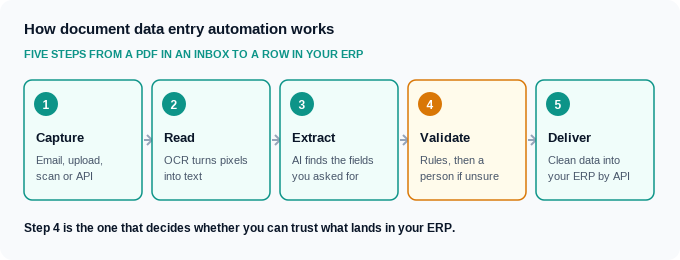
- Capture. Documents arrive by email, upload, scan or API. Paper gets scanned first [yes, paper still exists; it is hiding in your post room].
- Read. OCR turns the image into text.
- Extract. AI finds the fields you asked for: supplier, dates, totals, tax, line items, PO number.
- Validate. Rules check the data (does the total add up, is the supplier known, is the date sensible), and a person checks anything the software is unsure about.
- Deliver. The clean data goes into your ERP, AP tool or other system by API.
Step 4 is the one to ask every vendor about. Software that skips it just types wrong numbers faster than I ever could [and I was fast; wrong, but fast].
What automation still cannot do
Most guides stop at "eliminate errors". That is not quite true, and you deserve to know before you sign anything [I am the guide that tells you the restaurant is out of the special before you order it].
| Hard case | Why it is hard | What to do |
|---|---|---|
| Bad scans and phone photos | Blurry, skewed or cut-off text | Ask for PDFs, and route unreadable pages to a person |
| Handwriting | Every hand is different | Expect a person to check most handwritten fields |
| New layouts | A supplier changes its invoice template | Choose software that copes with new layouts without a setup project |
| Judgment calls | "Is this charge reasonable?" is not a field | Keep approvals and disputes with your team |
| Wrong source data | The supplier typed the wrong PO number | Validation rules flag it; a person contacts the supplier |
The honest goal is not zero people. It is people only where they add something: a judgment, a phone call, a decision [my finger would like it noted that it was never consulted on any decision].
Software also cannot fix data that was wrong on the document in the first place. If the supplier sends the wrong amount, automation will capture the wrong amount perfectly [garbage in, beautifully formatted garbage out]. That is why matching invoices to orders, covered in our guide to invoice validation, still matters after the typing is gone.
How to choose data entry automation software
Most data entry automation software demos beautifully on a perfect sample PDF. Your documents are not perfect samples [mine are mostly coffee-stained, and one is a photo of a photo].
| Ask this | Why it matters |
|---|---|
| Can I test it on my own documents? | Your ugliest real invoices tell you more than any demo |
| Who checks the fields it is unsure about? | Your team, the vendor's team, or nobody. Nobody is the wrong answer |
| Is accuracy guaranteed, and how is it measured? | A promise with no definition is just a nice number |
| How does the data reach my system? | API, file export or a ready-made connector. Ask for an example |
| What happens with a new layout? | Some tools need a template per supplier; some do not |
| How is it priced? | Per document, per user or a yearly license. Match it to your volumes |
| Who sets it up? | Your IT team, a partner, or the vendor |
Ask every vendor the same questions and write the answers down [a spreadsheet, typed by hand, for the last time]. If you are comparing tools for invoices specifically, our list of the best OCR software for invoice processing does some of that homework for you.
Where ECIT Digital fits
We do one of the four methods: documents. We do not build RPA bots or connect your CRM to your ERP, but if the data starts on an invoice, an order or another business document, that is our job [we are the method with the coffee-stained PDFs].

- Any document type. Our AI reads invoices, purchase orders and other business documents, whether they arrive as PDF, email or paper. Paper is scanned by our partners.
- Checked by people. Our team validates anything the AI is unsure about, with 99.8% accuracy guaranteed. Your team never touches the document.
- Into your system. We deliver the data into your ERP, AP tool or other system by API, and our team handles the setup and the connection.
- Pay per document. No expensive license.
See how it works for invoices on our PDF to electronic invoice and invoice processing services pages, or for customer orders on PDF to electronic order.
Want to know how much of your invoice process is still typed by hand? Run the free invoice health check: it scores your invoice process in about 3 minutes and estimates what you could save, based on your own numbers.
Stop retyping documents
Your documents in, clean data out, nobody typing
AI capture plus human validation, with 99.8% accuracy guaranteed. You pay per document, with no license.
So: find where your data starts, pick the method that fits, automate the boring high-volume thing first, and keep a person for the judgment calls. Nobody should spend a summer retyping delivery notes [my left index finger has asked me to end on that, and for once I agree with it].
Sondre Bratlandsmo
November 25, 2026
Book free live demo
Learn how the ECIT Digital solutions can help you with the help from one of our experts.


Frequently asked questions
Data entry automation is using software to get information into business systems without someone typing it. The data comes from another system through an API, from a web form the source fills in, from documents read with OCR and intelligent document processing, or from old screens copied by an RPA bot.
There are four: API integrations for data already in another system, web forms for data a person types for the first time, document capture (OCR and IDP) for data on PDFs, scans, emails or paper, and RPA bots for data in old systems with no API. Most businesses use two or three of them.
Not completely. AI handles most fields on clear documents, but bad scans, handwriting, new layouts and fields the software is unsure about still need a person to check them. Good setups send only those uncertain fields to a person and let the rest through automatically.
OCR (optical character recognition) turns an image of a document into text. IDP (intelligent document processing) uses AI on top of OCR to find the right fields in that text, such as the invoice number, the total and each line item, and to check them before the data is delivered.
Start with tasks that are high volume, use the same fields every time, rarely need a judgment call and cost real money when a mistake gets through. For most finance teams that is supplier invoices; for sales teams it is often customer purchase orders.
RPA works well for copying data between screens in old systems that have no API. It is not a good way to read documents, and a bot can break when a screen, button or field changes. Use an API where one exists and document capture for PDFs and scans.
Relevant articles
Duplicate Invoices: How They Slip In and How to Detect Them
Property Management Accounts Payable: Process, Controls and Owner Money