Accounts Payable Invoice Processing: 8 Steps from Inbox to Payment
Accounts payable invoice processing in 8 steps: what to check at each one, the invoice types that need different handling, and who fixes stuck invoices.
Quick answer
Accounts payable invoice processing is how a business takes a vendor invoice from arrival to payment. It runs in eight steps: receive the invoice, capture its data, validate that it is real and not a duplicate, match it to the purchase order and receipt, code it to the general ledger, get it approved, pay it on terms, and record and archive it. Ardent Partners puts the 2025 average at $9.84 and 8.2 days per invoice, against $2.65 and 2.9 days for best-in-class teams.
Why listen to us: ECIT Digital processes supplier invoices for finance teams every day. Our AI reads every invoice, our people check what the AI is unsure about, and we guarantee 99.8% accuracy on the data we deliver.
Years ago I was a freelancer, and a bad one. My first invoice, Invoice #001, had no PO number, the client's old company name and my bank details in a font I called "artistic" [it was Comic Sans].
It got paid 74 days later. I now know exactly where it got stuck, because I now work with AP teams every day. This guide follows a vendor invoice through every step of accounts payable invoice processing, with what to check at each one [Invoice #001 will be our crash test dummy].
Invoice processing is one part of the bigger accounts payable process, which also covers payments, reconciliation and month-end close.
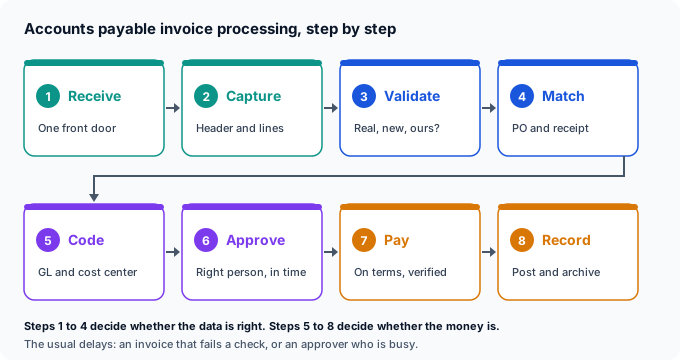
Accounts payable invoice processing steps at a glance
Here are all eight steps on one screen, for the reader with 40 invoices waiting [I can hear them from here].
| Step | What happens | The question it answers |
|---|---|---|
| 1. Receive | The invoice arrives in one place | Did we get it, and when? |
| 2. Capture | Header and line data are read and checked | What does it say? |
| 3. Validate | Vendor, duplicates, tax and bank details checked | Is it real, new and ours? |
| 4. Match | Compared to the PO and goods receipt | Did we order and receive this? |
| 5. Code | GL account, cost center and tax assigned | Where does the cost go? |
| 6. Approve | The budget owner signs off | Is someone accountable for it? |
| 7. Pay | Scheduled in a payment run on terms | When and how do we pay? |
| 8. Record | Posted and archived with its evidence | Can we prove it later? |
What is invoice processing?
Invoice processing is the work of turning a vendor invoice into a correct, approved payment and a clean entry in the books. In accounts payable, "vendor invoice processing" and "supplier invoice processing" mean the same thing [the vendor just has a fancier title in the US].
An invoice is only payable when it has the details you need to check it. Here is what to look for before anything else happens.
| What the invoice shows | Why AP needs it |
|---|---|
| Vendor name, address and tax ID | To match the vendor master and file tax forms |
| Your legal entity name and address | To book it to the right company |
| A unique invoice number | To catch duplicates |
| Invoice date and supply date | To set the due date and the right period |
| PO number, if there is one | To match it to what you ordered |
| Line items: quantity, unit price, description | To match quantities and code each line |
| Tax rate and tax amount | To post and reclaim tax correctly |
| Total, currency and payment terms | To pay the right amount on time |
In the UK the rules are written down. HMRC says "You must show the following details on any VAT invoice you issue", including a sequential number, the supplier's VAT number and the tax point. Without those, you cannot reclaim the VAT, because "Your customers need VAT invoices as evidence for reclaiming, as input tax, the VAT you have charged them." [Invoice #001 had none of this, but in fairness, neither did I].
Steps 1 and 2: Receive the invoice and capture the data
Every invoice should arrive through one front door: one email address, one queue, with paper scanned once on arrival. Invoice #001 went to a sales manager's personal inbox, which explains the first three weeks [he was on holiday, I was not invited].
Ardent Partners reports that "slightly more than half (51.4%) of all invoices are submitted electronically", which still leaves a lot of PDFs and paper to read. And a PDF in an email is not an e-invoice: the Federal Reserve-backed standards catalog defines one as "in a structured digital format which allows for automated processing" [sorry, PDF, you are just a picture of an invoice]. Our guide to paperless accounts payable covers how to get there.
Capture means reading the header (vendor, invoice number, dates, totals) and the line items (quantity, unit price, description). Lines matter because you cannot match quantities against a PO without them [the total alone tells you nothing about the 40 chairs].
| How the invoice arrives | How the data gets captured |
|---|---|
| E-invoice (PEPPOL, XML) | Data comes in structured, nothing to read |
| PDF by email | AI reads the fields, a person checks the unsure ones |
| Paper | Scanned once, then handled like a PDF |
| Vendor portal | Downloaded, then handled like a PDF |
Whatever reads the invoice, someone has to check the fields it is unsure about. That is how our invoice scanning keeps the 99.8% accuracy guarantee, and why your later steps can trust the data.
Step 3: Validate the invoice
Validation asks three questions: is this vendor real, have we seen this invoice before, and are the details right? It is the step that catches fraud and duplicate payments [and the step where Invoice #001 got its first rejection, for the wrong company name].
| Check | What you compare | If it fails |
|---|---|---|
| Vendor exists | Name and tax ID against the vendor master | Hold until the vendor is set up properly |
| Not a duplicate | Vendor, invoice number, date and amount against past invoices | Block and check with the vendor |
| Billed to us | Your legal entity name and address | Return to the vendor for a corrected invoice |
| Bank details unchanged | Bank account against the vendor master | Call the vendor on a number already on file |
| Math and tax add up | Lines plus tax against the total | Ask for a corrected invoice or credit note |
For US vendors, collect a Form W-9 when you set them up, not when you file in January. The IRS says the form is used "to provide your correct Taxpayer Identification Number (TIN) to the person who is required to file an information return with the IRS", which is how 1099 reporting works later [chasing W-9s in January is a winter sport nobody signs up for].
The bank detail check deserves its own paragraph. The AFP 2026 Payments Fraud and Control Survey found 76% of US organizations experienced attempted or actual payments fraud in 2025. A "please update our bank details" email is the classic opener [a real vendor never minds a phone call, a fake one always does].
Steps 4 and 5: Match the invoice and code it
Matching compares the invoice to what you ordered and received. A 2-way match checks the invoice against the purchase order, and a 3-way match adds the goods receipt, so you only pay for what actually arrived [Invoice #001 had no PO, so it skipped this step and went straight to purgatory].
| Match type | What it compares | Typical use |
|---|---|---|
| 2-way | Invoice and purchase order | Services and low-risk purchases |
| 3-way | Invoice, purchase order and goods receipt | Physical goods |
| 4-way | All three, plus an inspection or quality check | Goods that must pass inspection |
How many invoices can be matched depends on PO discipline. Ardent found 65.4% of invoices are linked to a purchase order on average, against 84.0% at best-in-class teams [everyone else is matching on vibes].
Small differences are normal, so set tolerances: a price difference under a set amount or percentage goes through, anything bigger becomes an exception. Our guide to invoice matching walks through tolerances with a worked calculation.
Coding tells the ledger where the money went. Each invoice line gets a general ledger account, a cost center, and the right tax treatment [this is where "Office supplies" quietly becomes the biggest account in the company].
| Invoice line | GL account | Cost center | Note |
|---|---|---|---|
| 40 office chairs | Furniture and equipment | Head office | May be capitalized above your asset threshold |
| Delivery | Freight in | Head office | Follows the main purchase |
| Sales tax or VAT | Tax account | None | Reclaimable VAT is posted separately |
A fictional invoice, to show the method. Your chart of accounts sets the real names.
PO invoices usually inherit their coding from the order. Non-PO invoices need a rule or a person, which is why written coding rules save so much back-and-forth [and stop one person being the only one who knows where the cleaning bills go].
Step 6: Approve the invoice
Approval makes a named person accountable for the spend. It is also where invoices go to wait: in Ardent's 2025 survey, the top challenge, "called out by 49% of AP executives, is the length of time it takes to approve invoices and payments" [Invoice #001 spent two weeks here, behind a quarterly review].
Three rules keep approvals moving [none of them involve guilt-tripping, though that works too]. Set approval limits by amount, name a backup approver for every budget owner, and send reminders before the payment due date, not after it.
| Invoice amount | Who approves |
|---|---|
| Up to $1,000 | Budget owner |
| $1,000 to $10,000 | Department head |
| Above $10,000 | Department head and the CFO |
A fictional policy, to show the method. Set limits that fit your company.
A matched PO invoice within tolerance often needs no extra approval at all, because the PO was approved already. Our accounts payable workflow guide covers approval routing in detail.
Steps 7 and 8: Pay on terms, then record and archive
Processing invoices for payment means scheduling each one into a payment run by its due date, not the day it was approved. Paying early only makes sense when there is a discount [and my bank details are spelled correctly].
Early payment discounts are worth chasing. The OpenStax finance textbook works through 2/10 net 30 terms and concludes "The annual cost to NAI of not taking advantage of the discount for quick payment is 36.73 percent." You only get the discount if steps 1 to 6 finish inside the 10 days [and the 10 days include weekends, sadly].
In the UK, paying late is also public. Large businesses "must publish its reports at least twice a year", showing how long they take to pay suppliers [your slowest approver, now on a government website].
Before the payment run, check that bank details still match the vendor master and that nothing in the run is a duplicate. Then post the invoice, link it to the PO, receipt and approval, and archive it [future you, during the audit, says thank you].
Check your own situation with your accountant: contracts, assets and other taxes can need longer.
Invoice types that need different handling
Not every invoice follows the same path. Some skip steps, and some need extra ones [Invoice #001 managed to be the worst kind, a non-PO invoice from an unknown vendor].
| Invoice type | What is different |
|---|---|
| PO invoice | Matched to the PO and receipt; coding comes from the order |
| Non-PO invoice | No match possible, so coding and approval go to the budget owner |
| Recurring invoice (rent, software) | Checked against the contract; consider a standing approval |
| Credit note | Reduces what you owe; link it to the original invoice |
| Utility invoice | Usage-based, so compare to past months for spikes |
| Foreign currency invoice | Convert at your policy rate and record the rate used |
| Pro forma invoice | A quote in invoice clothing; do not pay it as an invoice |
Where invoices get stuck, and who owns the fix
Ardent's Andrew Bartolini reports that "The invoice exception rate for AP departments is, on average, 18.4%." That is nearly one invoice in five needing a person, so every exception needs an owner [otherwise it belongs to everyone, which means no one].
| Exception | Who owns the fix | What they do |
|---|---|---|
| No PO number | Budget owner | Raise a PO or approve as non-PO |
| Price or quantity mismatch | Buyer or purchasing | Confirm with the vendor, request a credit note |
| Goods not received yet | Receiving or the requester | Confirm the receipt in the system |
| Possible duplicate | AP | Check with the vendor before anything is paid |
| Unknown vendor or new bank details | Vendor master owner | Verify by phone, then update the master |
| Unreadable or wrong data | AP or the capture provider | Fix the data at the source |
Track how long each exception has been open, like an aging report. An exception that is three weeks old is no longer an exception, it is a late payment in disguise [ask Invoice #001].
Manual vs automated invoice processing
Automation does not remove the steps, it removes the typing between them. Here is what changes per step [spoiler: the coffee breaks get shorter, sorry].
| Step | Manual | Automated |
|---|---|---|
| Receive | Several inboxes and the post room | One queue, every format |
| Capture | Typed by hand | Read by AI, unsure fields checked by a person |
| Validate | Spot checks | Every invoice checked for duplicates and bank changes |
| Match | Printed PO next to the invoice | Automatic, with tolerances |
| Code | From memory or a spreadsheet | From the PO or coding rules |
| Approve | Email chains | Routed by amount, with reminders |
| Pay and record | Keyed into the bank, filed in a cabinet | Scheduled runs, digital archive |
The best place to start is usually capture, because every later step trusts that data. See how invoice processing automation works with us.
What we see in the field
We sit at steps 1 and 2 for a lot of AP teams, which gives us a good view of what happens downstream [like a lifeguard, but for invoices].

- Bad data travels. A misread invoice number becomes a missed duplicate, and a misread total becomes a matching exception. Fixing it at capture fixes it everywhere after.
- Every invoice looks different. Paper, phone photos and 40-page PDFs all show up. Paper is scanned by our partners, then handled like any other file.
- Clients never touch the document. Our AI reads it, our team checks what the AI is unsure about, and clean data lands in their ERP or AP tool with 99.8% accuracy guaranteed.
- Line items are where the value is. Teams that capture only the header end up matching by hand.
"Construction invoices are complex and highly variable and ECIT provided a flexible and extensible data extraction model that worked wonderfully." - Terence Pua, CEO, Hinges AI
Curious how your own invoice processing compares? Run the free invoice health check: it scores your invoice process in about 3 minutes and estimates what you could save, based on your own numbers.
Invoice processing, done for you
Invoices in, clean data out, 99.8% accuracy guaranteed
Our AI reads every invoice, our team checks what the AI is unsure about, and validated data goes straight into your ERP or AP tool. You pay per document, with no license.
As for Invoice #001: I eventually sent Invoice #002 with a PO number, the right company name and a sensible font. It was paid in nine days [Comic Sans has been retired from my billing department]. Give every invoice a clean start at step one, and the other seven steps mostly take care of themselves.
Sondre Bratlandsmo
November 14, 2026
Book free live demo
Learn how the ECIT Digital solutions can help you with the help from one of our experts.


Frequently asked questions
Accounts payable invoice processing is how a business takes a vendor invoice from arrival to payment. It covers receiving the invoice, capturing its data, validating it, matching it to the purchase order and goods receipt, coding it to the general ledger, getting it approved, paying it on terms, and recording and archiving it.
The invoice processing steps are: 1) receive the invoice in one place, 2) capture the header and line item data, 3) validate the vendor, check for duplicates and verify bank details, 4) match the invoice to the purchase order and goods receipt, 5) code it to a general ledger account and cost center, 6) get it approved, 7) schedule and pay it on terms, and 8) post and archive it.
Vendor invoice processing is the accounts payable work of checking, approving and paying the invoices your suppliers send you. It means the same as supplier invoice processing. The aim is to pay every valid invoice once, on time and to the right bank account, and to record it correctly in the books.
To process invoices for payment, schedule each approved invoice into a payment run by its due date, or earlier if the vendor offers an early payment discount. Before the run, confirm the vendor's bank details still match your vendor master and check the run for duplicates. After payment, post the invoice and keep it with its purchase order, receipt and approval.
Ardent Partners' State of ePayables 2025 puts the average invoice processing cycle at 8.2 days from receipt to approval, against 2.9 days for best-in-class AP teams. The biggest delays usually come from slow approvals and invoices that need a person to fix an exception, such as a missing PO number or a price mismatch.
A vendor invoice should show the vendor's name, address and tax ID, your legal entity name and address, a unique invoice number, the invoice date, the PO number if there is one, line items with quantity and unit price, the tax rate and amount, the total, the currency and the payment terms. In the UK, a VAT invoice must also show the supplier's VAT registration number and the tax point.
Relevant articles
AP Automation Business Case: How to Build One Your CFO Will Sign
Accounts Payable Metrics: 8 KPIs, Formulas and Benchmarks