Accounts Payable Process: 7 Steps, Flow and Best Practices
The accounts payable process in 7 steps: receive, capture, code, match, approve, pay and reconcile. Where each step breaks, and how to fix it.
Quick answer
The accounts payable process is the set of steps a business follows to pay its suppliers: receive the invoice, capture its data, code it to the right accounts, match it to the purchase order and delivery, get it approved, pay it, then reconcile and record it. Done well, every invoice is paid once, correctly and on time.
Why listen to us: ECIT Digital reads business documents for companies including SATS and Tellit Solutions, and we guarantee 99.8% accuracy on the invoice data we hand back. Step 2 of this process is our day job.
Let me guess. Somebody asked you to "document the AP process," and now you are here, Googling it like the rest of us [nods solemnly, also Googled it]. Good news: the accounts payable process is only seven steps. Bad news: I am going to walk you through all seven, and I brought jokes.
To stop this turning into a textbook, we will follow one invoice from start to finish. Meet invoice #4471. It is a $1,840 bill for printer toner, it was emailed at 4:58 pm on a Friday, and it has no idea what is about to happen to it.
On this page
- What is the accounts payable process?
- The 7 steps, as a flow
- Invoice processing: getting it in
- Invoice coding
- Invoice matching: 2-way, 3-way, 4-way
- The invoice approval workflow
- The payment process
- Invoice reconciliation
- The month-end close
- AP workflow: who does what
- How good is your process?
- Best practices
- Process improvement: where to start
- What we see in the field
The accounts payable process at a glance
Here is the whole thing on one screen, including the column nobody else bothers to write: what actually breaks. (Print it out. Tape it to the monitor of whoever keeps paying invoices twice.)
| Step | What happens | Who usually does it | What usually breaks |
|---|---|---|---|
| 1. Receive | The invoice arrives by email, post, supplier portal or e-invoice network and gets logged | AP clerk, shared inbox | Invoices sent to the wrong person, or never logged at all |
| 2. Capture | Supplier, invoice number, dates, amounts, tax and line items go into the system | AP clerk or capture software | Typos, missed line items, the same invoice entered twice |
| 3. Code | Each line gets a general ledger account, cost center and tax code | AP clerk, budget owner | Wrong account, so the monthly reports quietly lie |
| 4. Match | The invoice is checked against the purchase order and the goods receipt | AP clerk, purchasing, receiving | Price or quantity mismatch, missing PO number |
| 5. Approve | The budget owner signs off that the spend is real and expected | Approver | Invoices sitting in someone's inbox for weeks |
| 6. Pay | Payment goes out by ACH, wire, check or card on the due date | AP lead, treasury | Paying late, paying twice, paying a fraudster |
| 7. Reconcile and record | Payments are tied to the ledger and supplier statements, and accruals are booked at month-end | AP lead, controller | Supplier statements that never quite tie |
What is the accounts payable process?
The accounts payable process is how a business turns a supplier's invoice into a correct, approved, on-time payment and a clean entry in the books. It sits at the back end of procure-to-pay (P2P), right after purchasing and receiving.
Put simply, purchasing promises to pay, receiving confirms the stuff showed up, and accounts payable makes sure you pay for what you actually got. AP is the bouncer at the door of your bank account [cracks knuckles, checks list]. Polite, firm, and deeply suspicious of anyone called "Urgent Invoice - Please Pay Today."
The 7 accounts payable process steps, as a flow
The end to end accounts payable process has seven steps, and each one hands a cleaner invoice to the next. Here is the full cycle as a flow chart, in the order most teams run it.
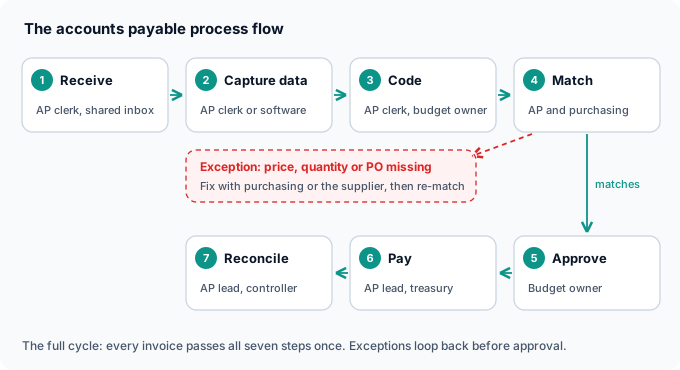
Some teams match before they code, and some start the clock at the purchase order. The order matters less than you think [whispers: it really does not matter that much]. What matters is that no step gets skipped, because every skipped step comes back later wearing a fake mustache.
Accounts payable invoice processing: getting the invoice in and readable
Invoice processing in accounts payable covers steps 1 and 2: receiving the invoice and getting its data into your system accurately. It is where most of the manual work lives. In a 2025 IFOL survey, 66% of AP teams were still keying invoice data into their ERP by hand.
Which means somewhere right now, invoice #4471 is being typed in by a human, one digit at a time, while a supplier is on hold [hold music intensifies]. The fix is capture software that reads both the header and every line item, then has a person check anything it is unsure about. That is how our invoice scanning software works, and it is why we can guarantee 99.8% accuracy on the data.
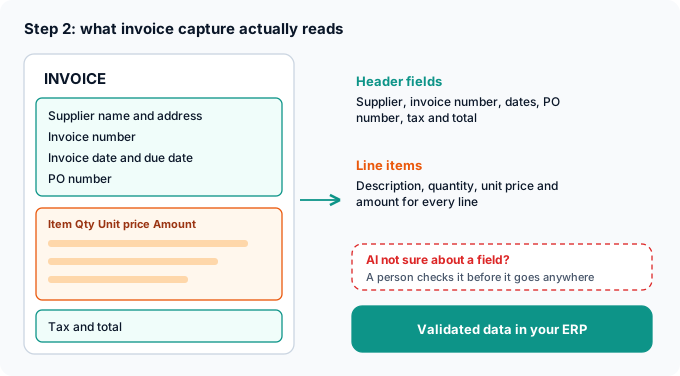
E-invoices skip the reading problem entirely, because they arrive as structured data instead of a picture of a document. In the UK, the government has confirmed mandatory e-invoicing for all VAT invoices from 2029. In the US there is no mandate yet, so PDFs will keep arriving for a while [sorry, I know, me too].
Invoice coding: telling the ledger where the money went
Invoice coding means assigning each invoice line to the right general ledger account, cost center, project and tax code. PO-backed invoices can inherit codes from the purchase order. Non-PO invoices (utilities, subscriptions, the mystery catering bill) need a rule or a human.
To be clear, "coding" here means accounting codes, not Python. If you are a developer who wandered in by mistake, you are welcome to stay, but there is no API in this section [hands you a coffee anyway]. Get coding wrong and nothing visibly breaks. Your reports just slowly start describing a different company.
Invoice matching: 2-way, 3-way and 4-way
Invoice matching checks that the invoice agrees with what you ordered and what you received before anyone pays it. A 2-way match compares the invoice to the purchase order. A 3-way match adds the goods receipt, and a 4-way match adds an inspection or quality check.
| Match type | Compares | Best for |
|---|---|---|
| 2-way | Invoice vs purchase order | Services and low-risk spend where nothing is physically delivered |
| 3-way | Invoice vs purchase order vs goods receipt | Physical goods, where you need proof the delivery arrived |
| 4-way | All of the above plus an inspection report | Goods with quality checks, like parts or materials |
Any line that does not match within your tolerance becomes an exception. Ardent Partners' 2026 benchmark puts the average invoice exception rate at 19.9%, against 11.8% for the best teams. That is one invoice in five getting stuck, which is roughly how often I lose my car keys.
The usual culprit is a missing PO number, closely followed by a supplier who "rounded up a bit." Even IOFM admits it has never found a true "no PO, no pay" policy without exceptions. If you buy physical goods, our purchase order matching and processing use case shows what automated matching looks like.
The invoice approval workflow
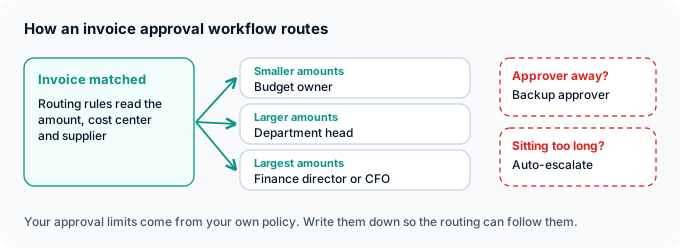
An invoice approval workflow routes each invoice to the person allowed to sign off on that spend, usually by amount, cost center or supplier. Good workflows set a deadline, name a backup approver for holidays, and escalate automatically when an invoice sits too long.
This is the step where invoice #4471 goes to sleep. It has been in a regional manager's inbox for nine days, nestled between a webinar invite and a "quick question" from 2024 [gently pokes inbox, nothing happens]. AP clerks describe chasing approvers by email and phone, stuck between suppliers who want paying and colleagues who will not click "approve."
The accounts payable payment process
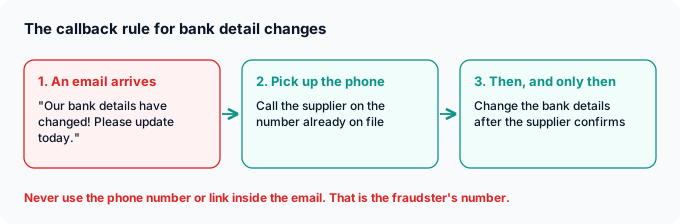
The accounts payable payment process schedules approved invoices for payment on their due date, bundles them into payment runs, and sends money by ACH, wire, check or card. Before anything leaves, someone confirms the supplier's bank details are the ones already on file.
Yes, checks still exist. The AFP found checks are still used for 26% of outgoing B2B payments, which is down from 81% in 2004 and still somehow not zero [stares at checkbook, checkbook stares back].
The scary part is fraud. In the 2026 AFP survey, 76% of US organizations were hit by attempted or actual payments fraud in 2025, and 74% were targeted by business email compromise. The classic move is a polite email announcing new bank details, usually with more exclamation marks than any real supplier has ever used. The fix is boring and it works: call the supplier on a number you already had, never the one in the email.
Invoice reconciliation: proving the books are right
Invoice reconciliation compares what you recorded and paid against your bank and your suppliers' statements, so you catch missing invoices, duplicates and payments that went nowhere. Most teams reconcile supplier statements monthly and tie the AP subledger to the general ledger at month-end.
It is the accounting version of checking your pockets before the laundry. Nobody enjoys it, and everybody is glad they did it the one time there was a $1,840 toner invoice in there [holds up soggy invoice #4471]. Match on invoice number first, then amount and date, and chase anything left over.
The accounts payable month-end close process
The accounts payable month-end close makes sure every liability for the month is in the books. It means enforcing an invoice cut-off date, accruing for goods received but not yet invoiced, accruing for invoices still waiting on approval, reviewing aged payables, and reconciling the AP subledger to the general ledger.
Month-end is where every shortcut from the previous 29 days shows up at once, like relatives at a wedding buffet. In a 2025 survey of 100 finance teams by close-software vendor Ledge, 27% needed more than seven business days to close. Getting invoices captured and approved during the month, not in the last two days, is what shortens it.

Accounts payable workflow: who does what
An accounts payable workflow is the map of who touches an invoice and when. In most companies, purchasing raises the PO, receiving confirms delivery, the AP clerk captures and matches, the budget owner approves, the AP manager or controller reviews, and treasury releases payment.
Write your accounts payable process and procedures down, even if it feels like homework [groans, writes it down anyway]. Cover who can add a new supplier, approval limits, match tolerances, the month-end cut-off, and the callback rule for bank changes. Then make sure no single person can do all of it, no matter how trustworthy Dave from finance seems. As APQC's CFO Perry Wiggins put it:
"One person should not have the power to approve a supplier, pay invoices, and sign the checks." - Perry D. Wiggins, CFO, APQC
How good is your accounts payable process? The benchmarks
Compare your numbers against published benchmarks for cost per invoice, cycle time, exception rate, invoices per person and duplicate payments. The gap between average and best-in-class teams is large on every one.
| Metric | Average or lower performers | Best-in-class | Source |
|---|---|---|---|
| Cost to process one invoice | $9.90 | $2.67 | Ardent Partners, 2026 |
| Days from receipt to payment-ready | 17.4 | 3.1 | Ardent Partners, 2024 |
| Invoice exception rate | 19.9% | 11.8% | Ardent Partners, 2026 |
| Invoices per AP employee per year | 6,488 (bottom quartile) | 20,964 (top quartile) | APQC via CFO.com, 2023 |
| Duplicate or erroneous payments, share of spend | 2% (bottom performers) | 0.8% (top performers) | APQC via CFO.com, 2020 |
Industry benchmarks from third-party research, summarized by the sponsors that published them. Figures vary between report years.
If you do not know your own numbers yet, welcome, you are among friends [waves from the back row]. Start with cost per invoice and days to payment-ready. Those two tell you most of the story.
Accounts payable best practices
The accounts payable best practices that show up in almost every expert source are simple to list and annoying to do. Here they are, minus the annoying part [the annoying part is still included, sorry].
- One front door for invoices. A single inbox or portal, so nothing gets lost in a sales rep's email.
- Capture once, never retype. Every manual keystroke is a chance to turn $1,840 into $18,400.
- Clean the vendor list quarterly. Remove duplicates and dead suppliers, and rotate who does it.
- Call back on every bank change, using a number you already had.
- Split the duties. Adding a supplier, approving an invoice and releasing a payment are three different people.
- Write tolerances down, so a 40-cent rounding difference does not trigger a meeting.
- Set approval deadlines before month-end, with automatic reminders and a backup approver.
- Reconcile supplier statements monthly, to catch invoices you never received.
Accounts payable process improvement: where to start
Start accounts payable process improvement at the front of the process. Measure your cost per invoice, days to payment-ready and exception rate, then fix capture first, because a bad number typed at step 2 travels through coding, matching, approval and payment before anyone notices.
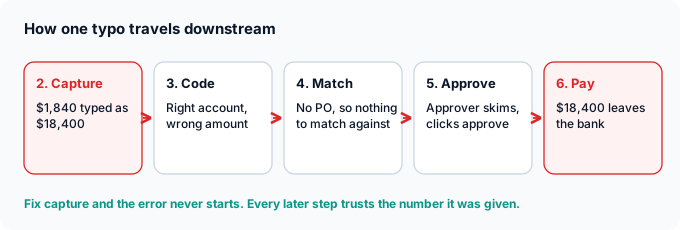
It is like fixing a leak by mopping the kitchen floor. You can mop forever [mops heroically], or you can turn off the tap upstairs. Once capture is clean, automate matching and approval routing, and invite suppliers onto e-invoicing.
If you want step 2 handled for you, our AP automation software reads every invoice, checks the hard fields with a real person, and sends validated data to your ERP. Your team keeps approvals and payments exactly where they are (yes, someone still has to click approve).
What we see in the field
Here is what the accounts payable process looks like from where we sit, which is step 2, all day, every day [adjusts headset, has no headset].

- Invoices arrive in every format at once. PDFs, scans and Peppol e-invoices land in the same pipeline. Paper invoices are scanned by our partners first, then processed like any other file.
- The AI does the reading, and people do the doubting. When our model is not confident about a field, someone on our team checks it before the data goes anywhere. That is how the 99.8% accuracy guarantee holds up.
- Clients never touch the document. Validated data goes straight into their ERP, AP workflow tool or property management system, by API, SFTP or email.
- Messy invoices are the real test. Construction is a good example, with line items that change on every job.
"Construction invoices are complex and highly variable and ECIT provided a flexible and extensible data extraction model that worked wonderfully." - Terence Pua, CEO, Hinges AI
Take step 2 off your plate
Clean invoice data in your ERP, 99.8% accuracy guaranteed
We read every invoice, header and line items, check what the AI is unsure about, and deliver validated data to your systems. You pay per document.
As for invoice #4471: it got captured, coded, matched, approved, paid exactly once and reconciled. The printer still jams [kicks printer]. Some problems are beyond accounts payable.
Sondre Bratlandsmo
October 22, 2026
Book free live demo
Learn how the ECIT Digital solutions can help you with the help from one of our experts.


Frequently asked questions
The accounts payable process has seven steps: receive the invoice, capture its data, code it to general ledger accounts, match it to the purchase order and goods receipt, get it approved, pay it, then reconcile and record the payment. Some teams match before they code, but every step needs to happen.
A 3-way match compares the supplier invoice with the purchase order and the goods receipt before the invoice is paid. If prices and quantities agree within your tolerance, the invoice moves on to approval. If they do not, it becomes an exception for purchasing or the supplier to resolve.
Set an invoice cut-off date, accrue for goods received but not yet invoiced and for invoices still waiting on approval, review aged payables and open exceptions, then reconcile the AP subledger to the general ledger. Approval deadlines a few days before close make the whole thing faster.
Start by measuring cost per invoice, days to payment-ready and exception rate. Then fix invoice capture first, because data errors there flow through every later step. After that, automate matching, add approval deadlines with backup approvers, and move suppliers onto e-invoicing.
Ardent Partners' State of ePayables 2024 research found best-in-class AP teams take 3.1 days from receiving an invoice to having it ready for payment, against an average of 17.4 days. Most of the gap comes from manual data entry and invoice exceptions.
Accounts payable is the money your business owes suppliers for goods and services it bought. Accounts receivable is the money customers owe your business for what it sold. AP pays invoices, while AR collects payment on them.
Relevant articles
Purchase Order vs Invoice: Differences and How They Match
Best Kofax Alternatives for Invoice Processing and Document Capture (2026)
