Accounts Payable Workflow: Steps, Roles and Automation
The accounts payable workflow mapped: who does each step, approval rules, exception handling and what to automate first, with benchmarks.
Quick answer
An accounts payable workflow is the path a supplier invoice follows from arrival to payment, and who acts at each step: AP captures and codes it, it is matched to the purchase order and receipt, the budget owner approves it, treasury pays it, and AP records and reconciles it. A good workflow sets approval rules, one owner per exception and a deadline for every hand-off.
Why listen to us: ECIT Digital runs the capture step of the AP workflow for finance teams every day, and we guarantee 99.8% accuracy on the invoice data we hand to your approval and payment tools.
Confession: I once followed a $3,200 air conditioning repair invoice that took 23 days to get approved, and it visited six inboxes on the way, like a confused intern on a building tour [follows invoice down the hallway with a clipboard]. Nobody did anything wrong. Nobody did anything at all, which turned out to be the whole problem.
This post zooms in on the workflow part of the accounts payable process: who touches each invoice, in what order, and what happens when it gets stuck. If you want the seven steps themselves, read that guide first, I will wait [checks watch, very patiently].
The accounts payable workflow at a glance
Here is the whole workflow on one screen, including the column most guides skip: the hand-off rule that stops an invoice from taking a nap [tucks invoice in, turns off the light].
| Stage | Owner | Hand-off rule | Automate it? |
|---|---|---|---|
| Receive and log | AP team | One intake address, logged the day it arrives | Yes, email and e-invoice intake |
| Capture and code | AP team or a capture service | Data is checked before it posts | Yes, with a person checking unsure fields |
| Match | AP and purchasing | Within tolerance goes straight on | Yes, 2-way and 3-way matching |
| Approve | Budget owner | Limit set by amount, backup approver named | Yes, routing and reminders |
| Pay | Treasury or AP lead | Paid on the due date, bank changes verified by phone | Partly, scheduled payment runs |
| Record and reconcile | AP lead and controller | Supplier statements reconciled monthly | Partly, statement matching |
What is an accounts payable workflow?
An accounts payable workflow is the sequence of tasks, owners and rules that moves a supplier invoice from arrival to payment. The AP process says what has to happen. The workflow says who does it, in what order, and what happens when something fails a check (spoiler: usually a 14-message email thread).
Think of the process as the recipe and the workflow as the kitchen rota [hands out tiny chef hats]. Same dish, but now somebody is actually in charge of the onions.
The accounts payable workflow, lane by lane
Most AP workflows run through five sets of hands: the supplier, the AP team, purchasing and receiving, the budget owner and treasury. Here is how a PO-backed invoice moves between them.

The boxes are rarely where the time goes. The arrows are [points accusingly at the arrows]. Every time an invoice changes lanes it lands in someone's inbox, and inboxes are where my air conditioning invoice spent most of its 23 days.
Ardent Partners found the industry average is 8.2 days to process an invoice, against 2.9 days for teams with advanced automation. That is more than five extra days of an invoice sitting somewhere, waiting for a human [sets an out-of-office reply, out of solidarity].
Who does what in the accounts payable workflow
Every AP workflow needs one named owner per step, plus a rule for who covers when that person is away. Here is the typical split in a US mid-size company, with the column that keeps auditors calm.
| Role | Owns | Should never also |
|---|---|---|
| AP clerk or specialist | Logging, capture, coding and matching | Add or change supplier bank details |
| AP manager or lead | Exceptions, payment runs, supplier questions | Approve invoices for their own team |
| Budget owner | Approving spend for their cost center | Release the payment |
| Purchasing | Purchase orders and price disputes | Approve invoices for their own orders |
| Receiving | Confirming goods or services arrived | Enter invoices |
| Controller or CFO | High-value approvals, month-end, controls | Do all of the above alone |
The right-hand column is segregation of duties, which is a fancy way of saying nobody gets to be the whole movie [confiscates the director's chair]. If one person can add a supplier, approve the invoice and release the payment, your workflow has a single point of failure with a desk plant.
Approval routing: who signs off on what
Approval routing sends each invoice to the person allowed to approve it, usually based on the amount, the cost center and whether it has a purchase order. Write the rules down as an approval matrix, so nobody has to guess and nobody can shop around for a friendly approver.
| Invoice | Approver | Backup | Deadline |
|---|---|---|---|
| PO-backed, matched within tolerance | No extra approval, the PO already approved the spend | Not needed | Next payment run |
| Non-PO, under $5,000 | Budget owner | Their manager | 3 working days |
| Non-PO, $5,000 to $25,000 | Department head | Controller | 3 working days |
| Any invoice over $25,000 | Controller or CFO | A second executive | 5 working days |
| First invoice from a new supplier | Budget owner plus AP lead | Controller | Before any payment |
A sample matrix to adapt, not a standard. Set the limits to match your own delegation of authority policy.
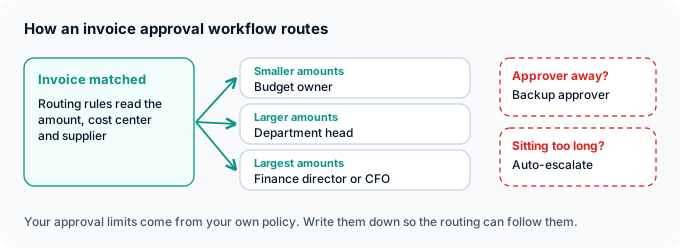
My air conditioning invoice had no matrix, so it went to everyone who had ever touched a thermostat [counts six inboxes on one hand, needs the other hand]. With a matrix, it goes to the facilities budget owner, with a backup named for holidays.
Test the routing with real invoices, because even software gets confused. One QuickBooks user running a two-step approval reported that "the system sometimes treats it as if both the first and second approvals have been completed". I test mine twice and trust it never [squints at approval log].
PO and non-PO invoice workflows
PO-backed invoices follow a matching path: the invoice is checked against the purchase order and the goods receipt, and anything within tolerance moves on without a human. Non-PO invoices (utilities, subscriptions, legal fees, the mystery catering bill) have nothing to match against, so they need coding rules and a named approver instead.
| PO invoice | Non-PO invoice | |
|---|---|---|
| Proof the spend was agreed | The purchase order | The approver's sign-off |
| Main check | 2-way or 3-way match | Coding and approval |
| Who approves | Usually nobody extra, if it matches | Budget owner, by amount |
| Typical risk | Price or quantity differences | Wrong account, unapproved spend |
Most guides only draw the PO path, as if the electric company sends you a purchase order first (it does not, I asked, they hung up) [stares at phone]. For the PO side in depth, read purchase order vs invoice, or see how automated purchase order matching works.
Exception handling: what happens when an invoice gets stuck
An exception is any invoice that fails a check: a price that does not match the PO, a missing goods receipt, no PO number, a possible duplicate or new bank details. A good workflow routes each type to one owner with a deadline, instead of parking it in a shared inbox.

Ardent Partners puts the average invoice exception rate at 19.9%, against 11.8% for Best-in-Class teams. That is one invoice in five taking the scenic route [hands the invoice a tiny map]. Ardent's founder Andrew Bartolini sums it up:
"Most AP teams spend too much time managing exceptions." - Andrew Bartolini, Ardent Partners
The scariest exception is a polite email announcing new bank details. In the AFP's 2026 Payments Fraud and Control Survey, 74% of US organizations were hit by business email compromise in 2025, and 76% faced attempted or actual payments fraud. So build the callback into the workflow itself: a bank change is approved by calling a number you already had, never by replying to the email [hides phone from scammers].
Start at step 2
Many exceptions start as a wrong number typed at capture. ECIT Digital reads every invoice, has a person check anything the AI is unsure about, and sends 99.8% accurate data into your approval workflow. See how our AP automation fits your workflow.
Invoice processing workflow: getting the data in clean
The invoice processing workflow is the front of the AP workflow: receiving the invoice, capturing its data and checking that data before anything is matched or approved. Errors made here travel through every step that follows.
In a 2025 IFOL survey, 66% of AP teams were still keying invoice data into their ERP by hand, and 63% spent more than 10 hours a week processing invoices. That is a lot of hours spent being a very expensive photocopier [photocopies own face, regrets it].
| Intake path | How it arrives | Workflow rule |
|---|---|---|
| Email PDFs | Attached to supplier emails | One shared address, logged automatically, never a personal inbox |
| Paper | By post | Scanned first, then handled exactly like a PDF |
| E-invoices (Peppol, EDI) | As structured data | Nothing to read, straight to matching |
| Supplier portals | Waiting on the supplier's website | Downloaded on a schedule, not whenever someone remembers |
Whatever the path, add a check before the data posts, because a typo caught here costs a minute and a typo caught at month-end costs a Friday [cancels Friday plans]. That check is our day job: our invoice scanning software reads header and line items, and a person validates anything uncertain.
Accounts payable workflow automation: what to automate first
Automate the AP workflow from the front: intake and capture first, then matching and approval routing, then payments. Each step only works as well as the data it receives, so automating approvals on top of bad data just gets wrong invoices approved faster.
| Step | Manual workflow | Automated workflow |
|---|---|---|
| Intake | Invoices in personal inboxes, logged when someone notices | One address, logged on arrival |
| Capture | Typed in by hand | Read automatically, unsure fields checked by a person |
| Matching | Printed PO and receipt, compared by eye | Matched automatically within tolerance |
| Approval | Forwarded by email, chased by phone | Routed by rules, with reminders and escalation |
| Payment | Checks signed in batches | Scheduled runs, bank changes verified |
| Reconciliation | Spreadsheets at month-end | Statements matched, only differences flagged |
If your workflow still involves a printer, you are in good company: Ardent Partners reports that only 46% of organizations have deployed comprehensive ePayables solutions [pats printer, printer jams].
The payoff is capacity. APQC data cited by Stampli shows an AP employee handles about 10,853 invoices a year on average and 23,333 when the process is fully automated, which is like getting a second you without the awkward cloning paperwork [shakes hands with clone]. To compare tools, see our roundup of the best AP automation software.
Accounts payable workflow metrics to track
Track a handful of numbers that show where your workflow stalls: cost per invoice, days to process, exception rate, invoices per AP employee and approval time. Measure them monthly and compare against published benchmarks.
| Metric | How to calculate it | Benchmark | Source |
|---|---|---|---|
| Cost per invoice | Total AP cost divided by invoices processed | $9.90 average, $2.67 Best-in-Class | Ardent Partners, 2026 |
| Days to process | Receipt to payment-ready, averaged | 8.2 days average, 2.9 with advanced automation | Ardent Partners, 2025 |
| Exception rate | Invoices flagged divided by invoices received | 19.9% average, 11.8% Best-in-Class | Ardent Partners, 2026 |
| Invoices per AP employee | Invoices a year divided by AP staff | 10,853 average, 23,333 fully automated | APQC, via Stampli |
| Approval time | Days from routing to approval | Set your own target | Your own data |
Benchmarks from third-party research, published by the vendors that sponsored or host it. Definitions differ between reports.
If approval time is your biggest number, the workflow is probably fine and an approver is not [glances at the regional manager]. Fix that with deadlines and escalation, not new software.
How to map your own accounts payable workflow
To map your AP workflow, follow a few real invoices from arrival to payment, write down every owner and hand-off, then turn what you find into written rules. It takes an afternoon and saves months [promises, crosses fingers behind back].
Follow five real invoices
Pick a PO invoice, a non-PO invoice, a credit note, an exception and a first invoice from a new supplier, and record every hand-off.
Name every owner
One person per step, plus a backup for holidays and sick days.
Count the waiting
Note how long each invoice sat between steps, not just how long the work took.
Write the rules
Approval matrix, match tolerances, exception owners and the bank-change callback.
Fix the front first
Clean up intake and capture before you automate approvals.
Measure monthly
Track the five metrics above and adjust the rules when a number drifts.
Mapping my air conditioning invoice took one afternoon and a lot of awkward questions [knocks on six doors]. The fix took a week: one matrix, one backup approver and a three-day deadline. If you get stuck on the last step, our guide to invoice reconciliation covers the month-end side.
What we see in the field
We sit at step two of a lot of AP workflows, which gives us a front-row seat to where they jam [eats popcorn, quietly].

- Workflows break where the data is wrong. A misread total turns a clean PO match into an exception and a three-day detour.
- Clients keep their own approval and payment tools. We deliver validated data into the ERP, AP workflow tool or property management system they already use.
- Every format arrives at once. PDFs, scans and Peppol e-invoices go through the same pipeline, and paper is scanned by our partners first.
- Human checking is the step most workflows skip. When our AI is unsure about a field, a person checks it before it reaches your approvers, which is how the 99.8% guarantee holds up.
"Construction invoices are complex and highly variable and ECIT provided a flexible and extensible data extraction model that worked wonderfully." - Terence Pua, CEO, Hinges AI
Fix the front of your workflow
Clean invoice data into your AP workflow, 99.8% accuracy guaranteed
We read every invoice, have a person check what the AI is unsure about, and deliver validated data into the approval and payment tools you already use. You pay per document.
As for my air conditioning invoice: it now gets approved in two days, by one person, who has a backup [pins a tiny badge on the backup]. The office is still too hot, but that is not an accounts payable problem.
Sondre Bratlandsmo
October 23, 2026
Book free live demo
Learn how the ECIT Digital solutions can help you with the help from one of our experts.


Frequently asked questions
An accounts payable workflow is the sequence of tasks, owners and rules that moves a supplier invoice from arrival to payment. It covers who captures, codes, matches, approves and pays each invoice, and what happens when an invoice fails a check.
Most AP workflows have six steps: receive and log the invoice, capture and code its data, match it to the purchase order and goods receipt, route it for approval, pay it on the due date, then record and reconcile the payment.
Start at the front: automate invoice intake and data capture, with a person checking any fields the software is unsure about. Then automate matching and approval routing, and finally payment runs and statement reconciliation.
Each type of exception goes to one owner with a deadline: price differences to purchasing, missing receipts to receiving, invoices without a PO to the budget owner, and possible duplicates or bank detail changes to the AP lead. Once fixed, the invoice goes back into approval.
The AP process lists what has to happen to an invoice, from receipt to reconciliation. The AP workflow adds who does each step, in what order, under which approval rules, and how exceptions are routed.
Map how real invoices move today, give every step one owner and a backup, write an approval matrix and exception rules, and clean up invoice capture before automating approvals. Track cost per invoice, processing time and exception rate every month.
Relevant articles
Invoice Reconciliation: What It Is and How to Do It
Best AP Automation Software: 13 Tools Compared for 2026