Best OCR Software for Invoice Processing: 13 Tools Compared
The best OCR software for invoice processing, compared: 13 tools, who checks the data, published pricing, accuracy claims and how to test them on your own invoices.
Quick answer
The best OCR software for invoice processing depends on who checks the data: developers usually pick Amazon Textract, Google Document AI or Azure Document Intelligence, AP teams that want a review screen pick Rossum, ABBYY Vantage, Nanonets or Docsumo, and small businesses pick Dext. If you want the data checked for you, ECIT Digital guarantees 99.8% accuracy.
Full disclosure: ECIT Digital makes one of the tools on this list. Every other tool is described from its own website, linked, and checked on 22 October 2026. We read invoices for companies including SATS and Tellit Solutions, so we know where this software earns its money and where it quietly gives up.
I have read more "best invoice OCR" lists than any healthy person should [stares into middle distance]. Here is the dirty secret: almost every one is written by a vendor that ranks itself first. This one is also written by a vendor, so at least I am telling you up front.
One thing before we start: somewhere in your building there is an invoice so ugly it should come with a warning label: faxed, scanned crooked, with a coffee ring over the total. Find it now and keep it close, because that invoice is going to decide which tool you buy.
The best OCR software for invoice processing, at a glance
Here are all 13 tools on one screen. It is the table I wish someone had handed me before my third demo of the week [yawns politely into sleeve].
| Tool | Type | Published pricing | Line items | Who checks unsure fields | Best for |
|---|---|---|---|---|---|
| ECIT Digital | Managed service | Per document, quote | Yes | ECIT's own team | Finance teams that want clean data, not a review queue |
| Rossum | Platform | From $18,000 a year | Yes | Your team, in Rossum | Enterprise AP and shared service centers |
| ABBYY Vantage | Platform | Quote only | Yes | Review step, operator not stated | Large enterprises and government |
| Nanonets | Platform | Usage-based, free starter credits | Yes | Your team | Startups to enterprise AP |
| Docsumo | Platform | Quote only, 14-day trial | Yes | Your team | High-volume AP and finance ops |
| Klippa DocHorizon | Platform and API | License or per document, quote | Yes | Human operators, not stated whose | Developers embedding OCR, EU hosting |
| Tungsten AP Essentials | AP software | Quote only | Yes | Your team | AP departments wanting capture plus matching |
| Amazon Textract | OCR API | 1 cent per page | Yes | You build it | Developers on AWS |
| Google Document AI | OCR API | 10 cents per 10 pages | Yes | You build it | Developers on Google Cloud |
| Azure Document Intelligence | OCR API | $10 per 1,000 pages | Yes | You build it | Developers on Azure |
| Mindee | OCR API | Monthly credit plans | Yes | Your team, in a review queue | Developers and AP product teams |
| Veryfi | OCR API | From $500 a month, free tier | Yes | Not published | Developers and fintech apps |
| Dext | Bookkeeping app | From $25.21 a month | Yes | You review and approve | Accountants and small businesses |
Prices and features as published by each vendor on 22 October 2026. Sources are linked in each tool's section below.
The four kinds of invoice OCR software
Invoice OCR software falls into four kinds: OCR APIs that developers build on, platforms with a review screen for your team, AP software with capture built in, and managed services that check the data for you. The real difference is who fixes the fields the software is unsure about.
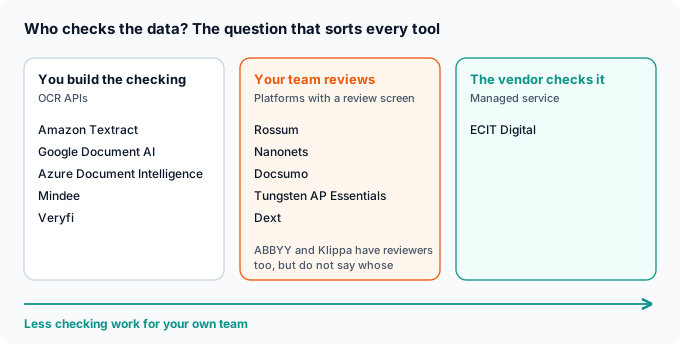
Every tool on this list reads invoices well most of the time. "Most of the time" is doing a lot of heavy lifting in that sentence [pats sentence on the back]. Someone has to catch the rest, and that someone is either a developer, your AP clerk, or the vendor.
The 13 best invoice OCR tools, one by one
Each tool gets a fact card built only from what the vendor publishes, then a short take. Where a vendor does not publish something, the card says so instead of me guessing [puts guessing hat back in drawer].
1. ECIT Digital
| Type | Managed document processing service |
| Pricing | Per document, extra fields or features cost more, no license fee |
| Line items | Yes, header and line items |
| Who checks | ECIT's team validates any field the AI is unsure about |
| Accuracy | 99.8%, guaranteed |
| Connects to | NetSuite, SAP, Microsoft, Oracle, Unit4 and others, by API, SFTP or email |
Yes, this is us, and yes, I put us first [looks at shoes]. The difference is who does the checking: our team validates the hard fields, so your staff never open a document. If you want a self-serve tool to tinker with on a Sunday, we are the wrong pick. If you want clean data in your ERP, see our invoice scanning software.
2. Rossum
| Type | Cloud document processing platform |
| Pricing | Starter from $18,000 a year, one-year minimum, 14-day trial |
| Line items | Yes, including complex line items |
| Who checks | Your team, in Rossum's review screen |
| Connects to | SAP, Coupa, NetSuite, Workday, Microsoft Dynamics |
Rossum is built for big AP teams with lots of ERPs and lots of invoices. Its homepage now says Coupa has acquired it, which matters if you are a Coupa shop, and it really matters if you are a Coupa competitor [raises eyebrows].
3. ABBYY Vantage
| Type | Document processing platform with an invoice skill for 35+ countries |
| Pricing | Not published, trial on request |
| Line items | Yes |
| Who checks | A manual review step, operators not specified |
| Deployment | ABBYY cloud or self-hosted |
ABBYY has been reading documents since before some of us could read [ages visibly]. Vantage is the current platform, and it suits large enterprises and public bodies that want to host it themselves. Budget for a sales conversation, because there is no price on the website.
4. Nanonets
| Type | Cloud invoice OCR and workflow platform |
| Pricing | Pay per run, free starter credits, then from $100 a month |
| Line items | Yes, down to SKU level |
| Who checks | Your team, and corrections retrain the model |
| Connects to | NetSuite, SAP, QuickBooks, Xero (some connectors Enterprise only) |
Nanonets has the most detailed published pricing of the platforms here, which in this industry is like being the tallest person in a room full of children [checks own height]. It is a good fit if you want to start small and have someone on your team who enjoys reviewing fields.
5. Docsumo
| Type | Cloud document processing platform |
| Pricing | Quote only, 14-day trial up to 1,000 pages, setup fees extra |
| Line items | Yes, including tables across pages |
| Who checks | Your team, in a review queue |
| Hosting | US, Frankfurt or London |
Docsumo checks the math as it reads, so quantity times unit price has to equal the line total [applauds quietly]. That is exactly the kind of check that catches a typo before it gets paid. It suits finance teams with real volume and a person available to work the queue.
6. Klippa DocHorizon
| Type | Document processing platform and API |
| Pricing | Annual license or per document, quote only |
| Line items | Yes |
| Who checks | Human-in-the-loop module, not stated whose operators |
| Hosting | EU hosted, US servers available |
Klippa is a developer-friendly option with European hosting, and its site now says Klippa has become Doxis. If you are confused, so is my bookmarks bar [deletes three bookmarks]. Ask directly who the human operators are before you count on them.
7. Tungsten AP Essentials
| Type | Cloud AP software with invoice capture (formerly Kofax ReadSoft Online) |
| Pricing | Not published |
| Line items | Yes, feeding 2-way and 3-way matching |
| Who checks | Your team, with validation rules and approvals |
| Connects to | Dynamics 365, Oracle Financials Cloud, NetSuite, Coupa |
If you want capture, matching and approvals in one box, this is that box [taps box approvingly]. It is more AP system than OCR tool. Our guide to Kofax alternatives covers the wider Kofax family if you are replacing it.
8. Amazon Textract
| Type | OCR API (AnalyzeExpense) |
| Pricing | 1 cent per page for the first million pages, small free tier for new customers |
| Line items | Yes |
| Who checks | You build it. Amazon A2I is no longer open to new customers |
| Best for | Developers already on AWS |
Textract is a superb engine with no car around it [mimes steering wheel]. You get the data and a confidence score, and your developers build the review screen, the ERP connection and the exception handling.
9. Google Document AI
| Type | OCR API (Invoice Parser) |
| Pricing | 10 cents per document of up to 10 pages |
| Line items | Yes |
| Who checks | You build it. Human-in-the-loop was deprecated in January 2024 |
| Languages | 13, including English, German, French and Spanish |
Same story as Textract, different cloud. Pricing per 10 pages is kind to long invoices, which is the nicest thing anyone has ever done for a 9-page utility bill [wipes away tear].
10. Azure Document Intelligence
| Type | OCR API (prebuilt invoice model) |
| Pricing | $10 per 1,000 pages, 500 free pages a month |
| Line items | Yes, in 27 languages |
| Who checks | You build it, with Microsoft's Studio tool for your own staff |
| Best for | Developers on Azure |
Azure's invoice model reads 27 languages, per Microsoft's documentation, against 13 for Google's invoice parser. It is the natural pick if your company already runs on Microsoft, and your IT team will tell you that unprompted [nods at IT team].
11. Mindee
| Type | Invoice OCR API |
| Pricing | Monthly plans priced in credits per page, 14-day trial |
| Line items | Yes |
| Who checks | Your team, in a review queue |
| Connects to | Zapier, Make, n8n |
Mindee is one of the few vendors that publishes separate accuracy numbers for header fields and line items, which I respect enormously [salutes]. It suits developers and product teams building invoice features into their own software.
12. Veryfi
| Type | Invoice OCR API |
| Pricing | Free for 100 documents a month, then a $500 monthly minimum at 16 cents per invoice |
| Line items | Yes |
| Who checks | Not published |
| Connects to | QuickBooks, Xero and other accounting systems |
Veryfi is fast and developer-first, with a free tier generous enough to test properly. Bring the ugly invoice from your drawer [taps drawer meaningfully].
13. Dext
| Type | Bookkeeping app for receipts and invoices |
| Pricing | From $25.21 a month for 250 documents and 5 users, 14-day trial |
| Line items | Yes |
| Who checks | You review and approve |
| Connects to | 36+ accounting platforms, including QuickBooks, Xero and Sage |
Dext is built for bookkeepers and small businesses, and it is very good at that job. If you process thousands of supplier invoices a month into an ERP, you have outgrown it, congratulations [throws small confetti].
What invoice OCR vendors claim about accuracy
Most invoice OCR vendors publish an accuracy claim, but they measure it in different ways and almost none of them guarantee it. Read each number as a claim, then test it on your own invoices.
| Vendor | What the vendor says | Guaranteed? |
|---|---|---|
| ECIT Digital | 99.8% accuracy on extracted data | Yes |
| ABBYY | "99.5% accuracy and 95% straight-through processing" | No |
| Docsumo | "99% field-level accuracy on 250+ document types" | No |
| Veryfi | "99%+ accurate data from any document type" | No |
| Dext | "over 99% accuracy" | No |
| Klippa | "up to 99%" | No |
| Mindee | 96.1% on header fields, 98.2% on line items | No |
| Tungsten | "95%+ first-time capture" | No |
Vendor claims as published on 22 October 2026. Each vendor measures differently, so the numbers are not directly comparable.
A claim of "99% accuracy" can mean 99% of fields, 99% of documents, or 99% on their favorite documents. I once claimed 99% accuracy at darts [points at wall full of holes]. Ask every vendor what they count, and on whose invoices.
OCR for invoice processing: how it works and where it fails
OCR for invoice processing turns an invoice image or PDF into text, then a model picks out the fields: supplier, invoice number, dates, totals, tax and every line item. Header fields are the easy part. Line items, multi-page tables, poor scans and handwriting are where accuracy drops.
Older tools needed a template per supplier layout, and someone had to build a new one every time a supplier redesigned its invoice [sighs in template]. Most modern tools read new layouts without templates, which is progress, but no tool reads a coffee ring. Remember that invoice in your drawer? This is its moment.
How to test invoice OCR software on your own invoices
Test every shortlisted tool on the same batch of your own invoices, a few hundred if you can, including your worst scans. Score header fields and line items separately, count how many invoices needed no human touch, and time how long each exception takes to fix.
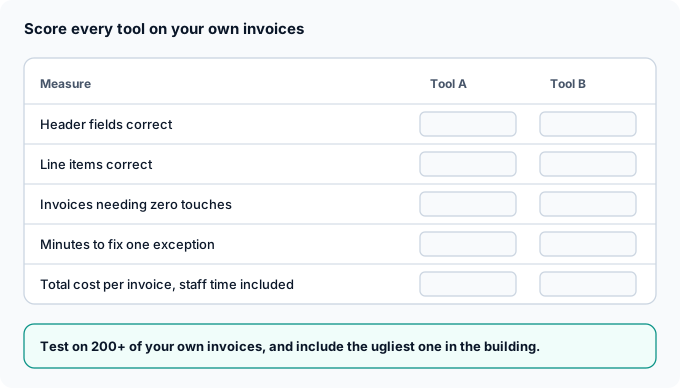
One vendor's guide suggests a proof of concept on 200 to 500 of your own invoices, and that is sensible advice from a competitor, which hurts me a little to say [clutches chest]. Use the same batch for every tool, or the comparison is just vibes.
- Score line items on their own. A tool can get every total right and still scramble the lines that your 3-way match depends on.
- Count zero-touch invoices. The share that needed nobody is the number that saves money.
- Time the exceptions. A cheap tool that needs four minutes of fixing per invoice is not cheap.
- Include the ugly one. You know the one [nods solemnly].
Invoice OCR pricing: per page, per document or per year
Invoice OCR is priced per page, per document, by usage credits, or by annual license. The model matters as much as the rate, because a six-page invoice costs six times more on per-page pricing than on per-document pricing.
| Pricing model | Who uses it | What to watch |
|---|---|---|
| Per page | Amazon Textract, Azure, Google (per 10 pages) | Long invoices cost more |
| Per invoice or document | Veryfi, ECIT Digital | Check what counts as one document |
| Credits or usage runs | Nanonets, Mindee | Read what one credit or run buys |
| Annual license or subscription | Rossum, Dext | Minimum terms and volume caps |
| Quote only | ABBYY, Docsumo, Klippa, Tungsten | Ask for setup fees up front |
The number nobody prints is staff time. Fixing exceptions is a cost, and it often dwarfs the per-page fee [does sad math on napkin]. Put it in your scorecard.
Best invoice scanning software vs best invoice capture software
Invoice scanning software turns paper into digital images, and invoice capture software reads the data out of those images and PDFs. Most tools on this list do capture. If you still receive paper, something has to scan it first.
At ECIT, paper invoices are scanned by our partners and then processed like any other file, so nobody on your team has to befriend the office scanner [waves at scanner, scanner jams]. Our invoice processing services explain how the whole thing fits together.
Do e-invoices need OCR?
No. A true e-invoice arrives as structured data, so there is nothing to read with OCR. In the UK, the government has confirmed mandatory e-invoicing for all VAT invoices from 2029, which will shrink the PDF pile over time. Until then, most companies need both, and ECIT handles Peppol e-invoices and PDFs in the same pipeline.
Sadly, this means the ugly invoice in your drawer will eventually retire [dabs eye with invoice]. Enjoy it while it lasts.
What we see in the field
Here is what we see from the inside, where invoices arrive in every format and every mood [puts on hard hat].

- The last few percent is where the work is. Reading most fields is easy for any modern tool. Catching the rest is what our validation team is for, and it is what the 99.8% guarantee rests on.
- Clients never touch the document. Validated data goes straight into their ERP, AP workflow tool or property management system.
- Variable invoices are the real test. Construction invoices change layout and line items on every job.
- Per-document pricing keeps it simple. No license, and you are not charged extra because a supplier sends a long invoice.
"Construction invoices are complex and highly variable and ECIT provided a flexible and extensible data extraction model that worked wonderfully." - Terence Pua, CEO, Hinges AI
Skip the review queue
Invoice data checked for you, 99.8% accuracy guaranteed
We read every invoice, header and line items, have a person check what the AI is unsure about, and deliver validated data to your ERP. You pay per document.
So, which tool should you buy? Whichever one reads your ugliest invoice correctly, on the first try, at a cost you can live with. Go get that invoice out of the drawer [hands it to you with tongs]. It has been waiting its whole life for this.
Sondre Bratlandsmo
October 22, 2026
Book free live demo
Learn how the ECIT Digital solutions can help you with the help from one of our experts.


Frequently asked questions
It depends on who checks the data. Developers usually choose a cloud OCR API such as Amazon Textract, Google Document AI or Azure Document Intelligence. AP teams that want a review screen choose platforms such as Rossum, ABBYY Vantage, Nanonets or Docsumo, and small businesses often use Dext. If you want the data checked for you, ECIT Digital guarantees 99.8% accuracy.
Modern invoice OCR reads most header fields correctly, but accuracy drops on line items, poor scans and handwriting. Vendors publish claims from about 95% to 99.5%, each measured in a different way. ECIT Digital guarantees 99.8% because people check the fields the AI is unsure about.
Invoice OCR is software that reads an invoice image or PDF and turns it into structured data, such as supplier, invoice number, dates, totals, tax and line items. That data can then be matched, approved and posted to an ERP without retyping.
Plain OCR only turns an image into text. To get usable invoice data you also need a model that finds the fields, such as the supplier, totals and line items. Most invoice capture tools on the market now combine both.
Run every shortlisted tool on the same batch of a few hundred of your own invoices, including your worst scans. Score header fields and line items separately, count the invoices that needed no human touch, and include staff time in the cost per invoice.
Both models exist. Cloud OCR APIs such as Amazon Textract and Azure Document Intelligence charge per page, while tools such as Veryfi and ECIT Digital charge per invoice or document. Per-page pricing costs more for long invoices.
Relevant articles
Purchase Order vs Invoice: Differences and How They Match
Accounts Payable Process: 7 Steps, Flow and Best Practices