Duplicate Invoices: How They Slip In and How to Detect Them
Duplicate invoices explained: how they slip in, why ERP checks miss them, the four layers of duplicate invoice detection, false alarms, and what to do if you paid twice.
Quick answer
A duplicate invoice is the same bill entered or paid more than once. It usually happens because the invoice arrived twice (by email and by mail, or as a reminder), the invoice number was typed differently, or the same supplier exists twice in the vendor list. Duplicate invoice detection works in layers: an exact match on supplier and invoice number, a normalized match that ignores dashes, spaces and leading zeros, a fuzzy match on supplier, amount and date, and a person who reviews the flags before payment.
Why listen to us: ECIT Digital reads and checks supplier invoices for finance teams every day, and delivers the invoice data their duplicate checks depend on.
I own two copies of a book about improving your memory. I bought the second one because I forgot I had the first [it is still unread, both times].
Your AP team does the same thing with invoices, only with real money and a supplier who is very happy to be paid twice. This guide shows how duplicates slip in, the four layers of duplicate invoice detection, the false alarms, and what to do if you already paid. It is part of our guide to accounts payable internal controls [the chapter I would have remembered, if I had read the book].
| How it slips in | What it looks like | Check that catches it |
|---|---|---|
| Sent twice | The same PDF by email and a paper copy by mail | Exact match on supplier and invoice number |
| Typed differently | INV-1001 one week, INV1001 the next | Normalized match that ignores dashes, spaces and zeros |
| Reminder treated as new | A "second notice" with a new date | Match on supplier, amount and invoice number, ignoring the date |
| Supplier listed twice | "Acme Inc" and "ACME Incorporated" | Vendor list cleanup, and matching on tax ID or bank account |
| New number, old bill | The same work billed again under a new number | Fuzzy match on supplier, amount and close dates |
Summary of common causes seen in US AP teams.
What is a duplicate invoice?
A duplicate invoice is the same bill showing up in your system more than once. If nobody catches it, it becomes a duplicate payment, which is the part that hurts [the invoice is just paper; the payment is money].
Most duplicates are honest mistakes. Some are not: a supplier, or someone pretending to be one, can resubmit an old bill with a fresh number, which is why duplicate checks are also a fraud control. Our guide to invoice fraud covers that side [the evil twin of the honest twin].
It happens more than most teams think. APQC benchmark data shows that even top performers report 0.8% of annual disbursements as duplicate or erroneous, against 2% for bottom performers. That is a share of payments, not of dollars, but one wrong payment can be a big one [I paid for my memory book twice; a supplier invoice is slightly bigger].
How duplicate invoices slip in
The table at the top shows the five usual routes. The pattern behind all of them is the same: the same bill reaches you in two forms, and nothing connects them [like two people at the same party who both brought potato salad].
| Stop it at the door | How |
|---|---|
| One way in | Ask suppliers to send invoices to one address, once, and stop mailing paper copies of emailed invoices |
| One supplier, one record | Check tax ID and bank account before adding a supplier. APQC advises "quarterly (or at the very least, annual) maintenance" of the vendor file |
| Invoices only | Never enter statements, reminders or quotes as invoices |
| Credits on file | Enter credit notes the day they arrive, so they are not paid out as invoices |
Messy vendor data makes it worse. APQC's analysis puts it plainly: "some of the biggest causes of duplicate or erroneous payments are errors, incomplete vendor information, or duplicate entries in the organization's MVF", the master vendor file. If Acme exists twice, a check on "same supplier" never fires, because as far as the system knows, it is two different suppliers [two Acmes, one bank account, zero alarms].
Statements cause their own trouble. A vendor statement lists open invoices, and if someone enters it as an invoice, every line on it can be paid again [the statement was a reminder, not a menu]. Never key a statement as a bill; use it to reconcile instead.
Why your ERP misses some of them
Many ERPs and accounting tools have a built-in duplicate check, and it is worth switching on. The catch is that the basic version usually looks for an exact match on supplier and invoice number [exact, as in "a dash makes it a different invoice"].
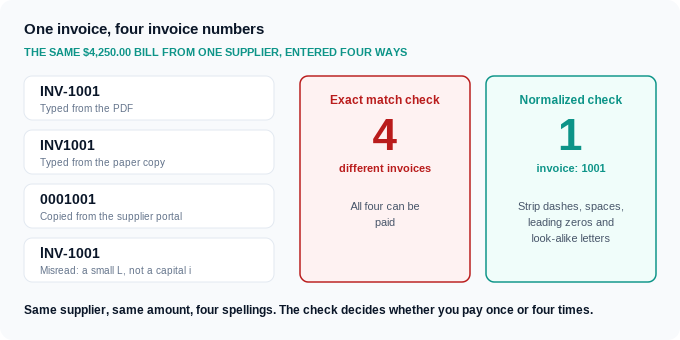
The same invoice number can be typed four ways, and an exact check sees four invoices. A small L looks like a capital I, an O looks like a zero, and the supplier portal adds leading zeros for fun [the portal does not have fun; it just looks like it does].
That is why the invoice number has to be read correctly in the first place. If it was misread when it came in, the duplicate check is comparing against the wrong thing. Our guide to invoice data extraction covers how that capture step works [garbage in, garbage paid twice].
Duplicate invoice detection, in four layers
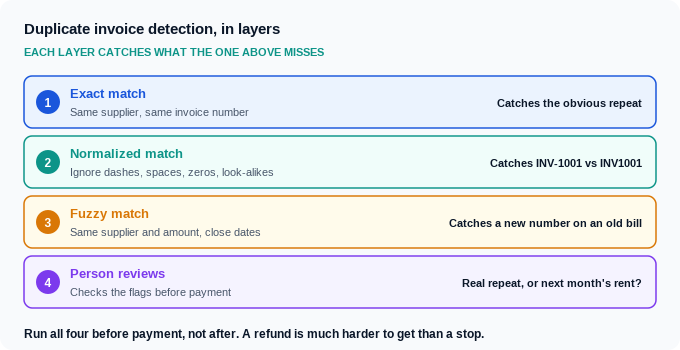
Good duplicate invoice detection is not one check. It is four, each catching what the one before missed [like checking your pockets, your bag, the car and then the fridge, which is where the keys always are].
| Layer | The rule | A common starting setting |
|---|---|---|
| 1. Exact match | Same supplier and same invoice number | Block, do not just warn |
| 2. Normalized match | Same supplier and invoice number after removing dashes, spaces, slashes and leading zeros | Also treat O and 0, and I, l and 1, as the same |
| 3. Fuzzy match | Same supplier and same amount, close dates, any invoice number | Within 30 to 60 days |
| Extra: cross-supplier check | Same amount and invoice number under two different supplier records | Also flag suppliers that share a bank account or tax ID |
Practitioner starting points, not official thresholds. Tune them to your own invoice volumes.
Every flag goes to a person before payment, not after. Stopping a payment takes a click; getting money back takes emails, phone calls and patience [patience I do not have, as the second memory book proves]. Pair these checks with the ones in our guide to invoice validation, and with three-way matching for goods, which stops a second bill for the same delivery.
False alarms: when it is not a duplicate
Turn on fuzzy matching and it will flag things that are perfectly fine. That is normal, and a little annoying [like my car alarm, which goes off when a leaf lands on it].
| Looks like a duplicate | Why it is not | How to tell |
|---|---|---|
| Monthly rent or a subscription | Same supplier, same amount, every month | Different invoice numbers and service periods |
| Installment billing | A big order billed in equal parts | Each invoice references the same order with a different part number |
| Two real orders | The same item ordered twice in a busy week | Two purchase orders and two deliveries |
| Invoice and credit note | Same amount, opposite signs | One is a credit; they cancel out |
Tell your fuzzy rule about recurring bills, so it only flags them when the service period repeats. A rule that cries wolf every day gets ignored by Friday [and then the real wolf walks in with an invoice].
Paid twice? How to get it back
It happens to everyone eventually. The good news is that most suppliers will give the money back when asked politely and clearly [most; there is always one].
- Confirm it really is a duplicate. Compare the two payments with both invoices, the purchase order and the delivery.
- Contact the supplier. Send both payment references and ask for a refund or a credit note against the next invoice.
- Record it. Log the overpayment so it is not forgotten, and follow up until it is settled.
- Fix the cause. Merge the duplicate vendor record, tighten the rule that missed it, or stop keying statements as invoices.
Check vendor statements every month for credits you have not used. A supplier who owes you money rarely sends a reminder [suppliers have excellent memories for what you owe them, and none at all for what they owe you].
Duplicate checks need clean data
Every layer above compares invoice data: supplier, invoice number, amount and date. If one of those was read wrong, the check compares the wrong thing and the duplicate walks right through [I would know; I bought that book twice].

We do not approve or pay invoices. ECIT Digital makes sure the data your duplicate check uses is the data on the invoice:
- Every field, read the same way. Our AI reads the supplier, invoice number, dates, amounts, PO number and line items, from PDF, email or paper. Paper is scanned by our partners.
- Checked by people. Our team validates every field the AI is unsure about, with 99.8% accuracy guaranteed.
- Into your system. We deliver the data by API into your ERP or AP tool, where your duplicate checks, matching and approvals run.
See how it works on our invoice processing services and invoice processing automation pages.
Want to see how your invoice process scores today? Run the free invoice health check: it scores your invoice process in about 3 minutes and estimates what you could save, based on your own numbers.
One invoice, one payment
Invoice numbers read right, so your duplicate check works
AI capture plus human validation, with 99.8% accuracy guaranteed. You pay per document, with no license.
So: clean up the vendor list, read the invoice number right, run all four layers before payment, and teach the rules about rent. Pay every invoice once [and if you see a book about improving your memory, check my shelf first].
Sondre Bratlandsmo
November 25, 2026
Book free live demo
Learn how the ECIT Digital solutions can help you with the help from one of our experts.


Frequently asked questions
A duplicate invoice is the same bill entered or paid more than once. It usually happens when an invoice arrives twice, by email and by mail or as a reminder, when the invoice number is typed differently, or when the same supplier exists twice in the vendor list.
Use layered checks before payment: an exact match on supplier and invoice number, a normalized match that ignores dashes, spaces, leading zeros and look-alike characters, and a fuzzy match on supplier, amount and close dates. A person then reviews every flag before the invoice is paid.
Basic built-in checks usually look for an exact match on supplier and invoice number. If the number was typed differently, such as INV-1001 and INV1001, or the supplier exists twice in the vendor list, an exact check sees two different invoices.
Most are honest mistakes, such as an invoice sent twice or keyed twice. Some are deliberate, such as an old bill resubmitted with a new invoice number. Duplicate checks catch both, which is why they are part of accounts payable internal controls.
Confirm it is a real duplicate by comparing both payments with the invoices, purchase order and delivery. Then contact the supplier with both payment references and ask for a refund or a credit note, log the overpayment until it is settled, and fix the cause.
APQC benchmark data shows that even top-performing organizations report 0.8% of annual disbursements as duplicate or erroneous, while bottom performers report 2%. These figures are a share of payments made, not of the money paid.
Relevant articles
Property Management Accounts Payable: Process, Controls and Owner Money
Invoice Data Extraction: Fields, Line Items and Accuracy Checks