Invoice Data Extraction: Fields, Line Items and Accuracy Checks
Invoice data extraction explained: the fields to pull, templates vs AI vs AI plus a person, why line items are hard, and the checks that catch errors.
Quick answer
Invoice data extraction is pulling the fields off a supplier invoice (supplier, invoice number, dates, PO number, line items, tax and total) and turning them into structured data your ERP or AP tool can use. It is done with templates and rules (an invoice parser), with AI models that find fields by meaning, or with AI plus a person who checks the fields the AI is unsure about. Line items are the hardest part, and validation checks, such as line totals adding up to the invoice total, catch most errors before they reach your books.
Why listen to us: ECIT Digital extracts and validates supplier invoice data for finance teams every day, and delivers it into their ERP and AP systems.
I build flat-pack furniture by confidently ignoring the instructions. It always looks finished, and there is always one screw left over [the bookcase is fine; please do not lean on it].
Invoice data extraction has the same problem. The output looks finished, and somewhere a field is missing or wrong. This guide covers which fields to pull, the three ways to do it, why line items are the hard part, whether ChatGPT can do it, and the checks that find the leftover screw [it is part of our guide to document process automation, which has fewer screws].
| Approach | How it finds a field | Good for | Watch out for |
|---|---|---|---|
| Manual entry | A person reads and types | A handful of invoices a month | Typos, and it does not scale |
| Templates and rules (invoice parser) | A fixed position or a pattern, set up per supplier layout | A few suppliers whose layouts never change | Breaks when a supplier changes its invoice design |
| AI extraction | A trained model finds fields by meaning, on any layout | Many suppliers and layouts | Confident mistakes that nobody checks |
| AI plus a person | AI extracts, rules check, a person reviews unsure fields | Data that goes into your books | Ask who the person is and how fast they work |
Summary of the main approaches used by US AP teams.
What is invoice data extraction?
Invoice data extraction turns an invoice a human can read into data a system can use. The PDF goes in, and a structured record comes out with every field labeled, ready for your ERP [the furniture comes out of the box and actually stands up].
It is not the same as OCR. OCR turns the image into text, but text is just a pile of words; extraction decides which of those words is the invoice number and which is the phone number [OCR hands you all the screws; extraction tells you which one goes where].
Microsoft's documentation for its invoice model puts it well: "Accurate extraction of key data from invoices is typically the first and one of the most critical steps in the invoice automation process." Everything after it, from matching to approvals to payment, trusts what this step produced [no pressure, little step].
The fields to extract from an invoice
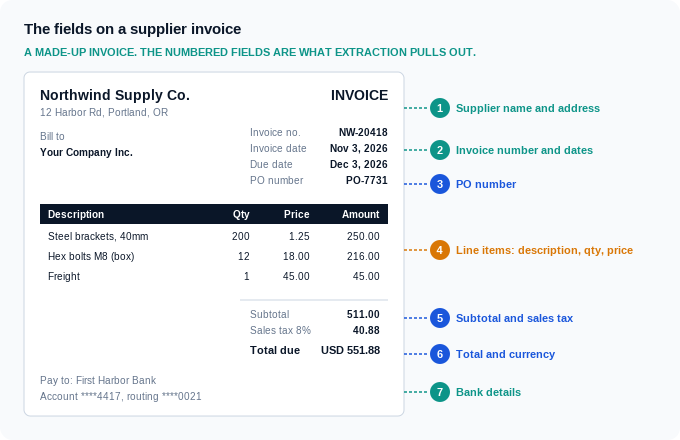
Most invoices carry the same set of fields, just arranged differently by every supplier on earth. Here they are on a made-up invoice [the supplier is fictional; the bolts are emotionally real].
| Field group | Fields | What it is used for |
|---|---|---|
| Header | Supplier name and address, invoice number, invoice date, due date | Finding the supplier, spotting duplicates, paying on time |
| References | PO number, customer account number, delivery note number | Matching the invoice to an order and a receipt |
| Line items | Description, quantity, unit price, line amount, item code | Matching, coding and spend analysis |
| Totals | Subtotal, sales tax, shipping, discounts, total, currency | Checking the math and posting the right amount |
| Payment | Bank name, account and routing number, payment terms | Paying the right account, and spotting changed bank details |
You do not always need every field. A small business may only need the header and the total, while a manufacturer matching to purchase orders needs every line [the more you build, the more screws you need].
Three ways to extract invoice data
Beyond typing it yourself, there are three approaches. Each one fixes the problem of the one before it, and brings a new one of its own [like every sequel I have ever watched].
1. Templates and rules: the classic invoice parser
A template tells the software where each field sits on a given supplier's layout, or which pattern to look for. The open-source tool invoice2data, for example, "searches for regex in the result using a YAML or JSON-based template system" [regex is a language that looks like a cat walked across a keyboard, and works].
Templates are fast and predictable when layouts never change. The catch is upkeep: one template per layout, and a supplier who redesigns its invoice breaks theirs overnight [usually the week you are on vacation].
| What happens when | Templates | AI extraction | AI plus a person |
|---|---|---|---|
| A new supplier sends its first invoice | Nothing, until someone builds a template | Usually read on the first try | Read, and unsure fields checked |
| A supplier redesigns its invoice | The template breaks | Usually still read | Still read and checked |
| A field is misread | Often caught, because it fails the pattern | Can slip through looking right | Flagged and fixed by a person |
2. AI extraction: finding fields by meaning
An AI model is trained on many invoices, so it finds the total because it looks like a total, not because it sits at a fixed spot. Microsoft says its prebuilt invoice model "currently supports invoices in 27 languages", which no pile of templates could manage [I support one and a half languages, on a good day].
The catch is that AI can be wrong and sure of itself at the same time. It does not leave the screw on the floor; it puts it in the wrong hole and tightens it [it is me, the AI is me].
3. AI plus a person
The third approach keeps the AI for the volume and adds two safety nets: validation rules that catch impossible values, and a trained person who checks only the fields the AI flags as unsure. Most invoices go straight through, and the hard ones get human eyes [the furniture helpline, if the helpline actually picked up].
This is the approach to use when the data goes into your books. Our guide to intelligent document processing explains how the AI part works in more detail.
Why line items are the hard part
Header fields are easy because there is one of each. Line items are a table, and tables on real invoices are a mess [like my cable drawer, but with sales tax].
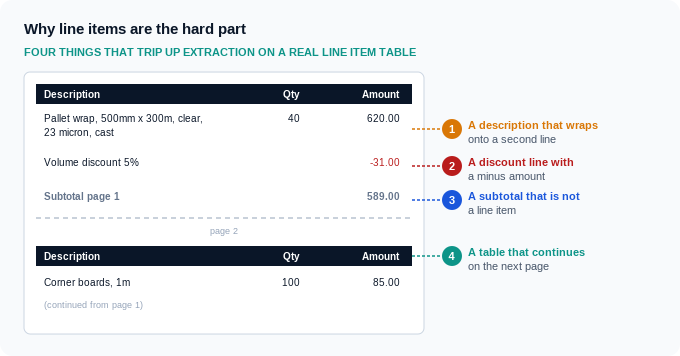
A description that wraps onto a second line can turn one item into two. A discount line has no quantity, a page subtotal looks like an item but is not one, and a table that runs onto page two needs to be joined back together [the screw is in the second box, which nobody opened].
Get any of these wrong and invoice matching fails, or worse, passes with the wrong numbers. If you match on line level, as in three-way matching, test any tool on your longest, ugliest multi-page invoices first [every AP team has one supplier whose invoices are basically a novel].
Can ChatGPT extract invoice data?
Yes, a general AI chat tool can read an invoice and give you the fields, and for ten invoices it may be all you need. I tried it on a receipt once and it was very polite about my coffee habit [it did not judge; my bank did].
| Question | Chat tool, pasted by hand | Invoice extraction system |
|---|---|---|
| Same fields and format every time? | Depends on how you ask each time | Yes, a fixed output |
| Flags fields it is unsure about? | Rarely | Yes, field by field |
| Checks totals and suppliers? | Only if you ask | Built-in rules |
| Audit trail of who changed what? | No | Yes |
| Delivers into your ERP? | No, you copy and paste | Yes, by API or export |
The risk is the confident wrong answer. NIST, the US standards body, calls it confabulation: "The production of confidently stated but erroneous or false content" [a fancy word for what I do at trivia night]. Also check your company's rules before pasting supplier bank details into a chat tool.
The validation checks that catch errors
Validation is counting the screws before you call the bookcase done. These checks compare the extracted data with itself and with your own records [it is boring, and it is the whole point].
| Check | What it catches |
|---|---|
| Line amounts add up to the subtotal | Missed, doubled or split line items |
| Subtotal plus tax and shipping equals the total | A misread total or tax amount |
| Quantity times unit price equals the line amount | A misread quantity or price |
| Supplier exists in your vendor master | A misread name, or an unknown supplier |
| PO number exists and is open | A misread PO, or a bill with no order |
| Invoice number not already paid for this supplier | Duplicates |
| Bank details match the vendor master | A misread account, or changed bank details |
| Dates make sense | A due date before the invoice date, or a year off |
The first three need nothing but the invoice itself, so every tool should run them. The rest need your vendor and PO data, which is where most invoice validation happens [the bank details check also helps against invoice fraud, which is a nice bonus for a math check].
How to choose an invoice parser
Every invoice parser demo uses a clean, one-page invoice from a supplier that does not exist. Your invoices are scanned sideways, with a coffee ring [I am not saying it was my coffee; I am not saying it was not].
| Ask this | Why it matters |
|---|---|
| Can I test it on 100 of my own invoices? | Include your worst scans and longest multi-page invoices |
| Does it extract line items, or only the header? | Many tools stop at the total |
| How is accuracy measured? | Per field or per invoice. One wrong field ruins a whole invoice |
| Who checks the fields it is unsure about? | Your team, the vendor's team, or nobody |
| Does it need a template per supplier? | Templates mean setup and upkeep |
| How does the data reach my ERP? | API, file export or a connector. Ask for a working example |
| How is it priced? | Per invoice, per page or per user. Pages add up fast on long invoices |
Measure accuracy per field and per invoice. A tool that gets 98% of fields right can still get far fewer whole invoices right, because one bad field spoils the invoice [the bookcase with one screw missing is still a bookcase you cannot lean on]. For a list of tools, see our guide to the best OCR software for invoice processing.
Extraction with a person behind it
We do the third approach: AI plus a person, as a service. Your team never opens an invoice, and I am not allowed anywhere near the furniture [company policy, after the bookcase].

- Header and line items. Our AI reads the supplier, invoice number, dates, PO number, line items, tax and any other field you ask for, from PDF, email or paper. Paper is scanned by our partners.
- Checked by people. Our team validates every field the AI is unsure about, with 99.8% accuracy guaranteed.
- Into your system. We deliver the data into your ERP or AP tool by API, where your matching, coding and approvals run. Your developers can also call our API directly.
- Pay per document. No expensive license.
See how it works on our invoice scanning software and PDF to electronic invoice pages. If you are still deciding which kind of automation you need, start with our guide to data entry automation.
Want to see how your invoice process scores today? Run the free invoice health check: it scores your invoice process in about 3 minutes and estimates what you could save, based on your own numbers.
Invoice data you can trust
Every field extracted and checked, line items included
AI capture plus human validation, with 99.8% accuracy guaranteed. You pay per document, with no license.
So: know which fields you need, pick the approach that fits your volume, test it on your ugliest line items, and run the checks every time. Count the screws before you lean on the bookcase [I still have one left over from 2019, and I have decided it is decorative].
Sondre Bratlandsmo
November 25, 2026
Book free live demo
Learn how the ECIT Digital solutions can help you with the help from one of our experts.


Frequently asked questions
Invoice data extraction is pulling the fields off a supplier invoice, such as the supplier, invoice number, dates, PO number, line items, tax and total, and turning them into structured data that an ERP or AP tool can use without anyone retyping it.
The usual fields are the supplier name and address, invoice number, invoice and due dates, PO number, line items (description, quantity, unit price, amount), subtotal, sales tax, shipping, discounts, total, currency, and bank and payment details. Which ones you need depends on whether you match invoices to purchase orders.
An invoice parser is software that reads invoices and outputs their fields as structured data. Older parsers use templates or patterns set up for each supplier layout; newer ones use AI models that find fields by meaning, so they work on layouts they have not seen before.
OCR turns an image of an invoice into text. Invoice data extraction goes further and decides which part of that text is the invoice number, the total, the PO number or each line item, then delivers those fields in a structured format.
A general AI chat tool can read an invoice and list its fields, which can work for a few invoices. For regular volumes it lacks a fixed output, field-level confidence flags, validation checks, an audit trail and delivery into your ERP, and it can state wrong values confidently.
Run validation checks: line amounts add up to the subtotal, subtotal plus tax equals the total, quantity times price equals each line amount, and the supplier, PO number and bank details match your records. Send any field that fails a check, or that the software is unsure about, to a person.
Relevant articles
Duplicate Invoices: How They Slip In and How to Detect Them
Property Management Accounts Payable: Process, Controls and Owner Money