Touchless Invoice Processing: What It Means, How to Measure It, and What Stays Human
What touchless invoice processing really means, the Ardent Partners benchmarks, how to calculate your own touchless rate, and how to reduce manual invoice work.
Quick answer
Touchless invoice processing means an invoice is received, approved and scheduled for payment without anyone in accounts payable handling it by hand. Ardent Partners' 2026 research found that 38.3% of invoices flow straight through untouched, while 19.9% need manual exception handling. You raise your touchless rate by fixing the causes of exceptions: unreadable or missing invoice data, mismatches with purchase orders, missing POs, slow approvals and duplicates.
Why listen to us: ECIT Digital runs invoice capture as a service. Our clients never touch a document: our AI reads every invoice, our team fixes what the AI is unsure about, and clean data arrives in their system with 99.8% accuracy guaranteed.
"Touchless" sounds like a car wash. And like a touchless car wash, there is always a man with a sponge at the end, doing the bits the machine missed [we have been that man, it is not glamorous].
This guide is about getting rid of the sponge, or at least hiding him: what touchless means, how to measure it, and what should stay human [yes, some of it should].
It is part of our guide to accounts payable automation best practices.
What is touchless invoice processing?
Ardent Partners, the research firm that tracks this most closely, gives the clearest definition: "Straight-through, or "touchless," processing is defined as an invoice being received, approved, and payment scheduled without any manual intervention on the part of the AP team." Note the last six words [they are doing a lot of work].
"On the part of the AP team" means a manager clicking approve is fine. An AP clerk retyping a total, chasing a PO or fixing a vendor name is not. The terms get used loosely, so here is how they differ.
| Term | What it means |
|---|---|
| Automated invoice processing | Software does some steps, such as reading the invoice, but people may still fix and route it |
| Touchless or straight-through processing | The invoice is received, approved and scheduled for payment with no manual work by AP. Ardent uses the two terms for the same thing |
| Exception | Any invoice that drops out and needs a person to step in |
Touchless rate benchmarks
Here are the numbers we could trace back to Ardent's own published material. Competing articles quote higher figures, but we could not find them in the original reports, so they are not here [boring of us, we know].
| Measure | Figure | Source |
|---|---|---|
| Invoices that flow straight through | 38.3% | Ardent Partners, 2026 |
| Invoices that need manual exception handling | 19.9% | Ardent Partners, 2026 |
| Average cost to process an invoice | $9.84 | Ardent, State of ePayables 2025 |
| Average invoice processing time | 8.2 days | Ardent, State of ePayables 2025 |
| Best-in-Class straight-through processing | More than 1.8 times their peers | Ardent, State of ePayables 2025 |
Ardent defines Best-in-Class as "the 20% of enterprises with the lowest average invoice processing costs and shortest average invoice process cycle times", and says their per-invoice costs are "79% lower than their peers". In other words, the teams that touch less also spend less [the car wash with no sponge man is also the cheap one, who knew].
How to calculate your touchless rate
Nobody publishes a standard formula, so here is a simple one you can run on last month's data [no spreadsheet wizardry needed, just honesty].
Touchless rate
Invoices scheduled for payment with no manual AP work ÷ all invoices received in the period × 100
For instance: 1,000 invoices received in October, 380 went through with nobody in AP keying, fixing, matching or chasing them. Touchless rate: 38%.
Three rules keep it honest. Count a touch as any manual action by AP, including a quick correction. Leave normal business approvals out of the count, in line with Ardent's definition. And measure the same window every month, or the number will flatter you [it always wants to flatter you].
Why invoices fall out of touchless processing
Every invoice that drops out is an exception, and they cluster in the same few places. Think of them as the spots the car wash brush always misses [the wing mirrors, every single time].
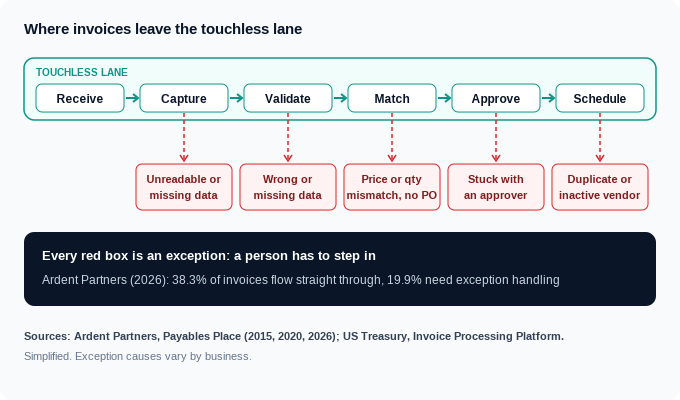
Data problems lead the list. Ardent's research has found that "73% of all invoice exceptions are linked to a discrepancy in invoice information". An older Ardent study listed the top causes as a "Discrepancy between PO and invoice information (68%)", a "Lack of a purchase order (37%)" and a "Bottleneck in the invoice approval process (31%)" [old data, same old problems].
Duplicates and vendor records trip things up too. The US Treasury's Invoice Processing Platform notes that "An invoice might be rejected if it is a duplicate or none of the items on the invoice were ordered", and it also rejects invoices when the supplier account is inactive. Our guides on invoice validation and three-way matching go deeper on both.
What should stay human
A 100% touchless rate is not the goal, and anyone promising it is selling something [we are also selling something, but at least we are admitting it].
| Fix with better data and automation | Keep as a human decision |
|---|---|
| Typos, missing fields and unreadable scans | Disputes with a supplier |
| Small formatting differences between PO and invoice | Real price changes outside the agreement |
| Routing an invoice to the right approver | Adding a new vendor or changing bank details |
| Spotting likely duplicates | Approving spend with no purchase order |
This split is our practitioner view, not an official standard. The idea is simple: machines handle the mechanical fixes, and people make the calls that carry risk [especially anything involving bank details, that is where fraud likes to live].
How to reduce manual invoice processing
You do not need a big-bang project. Work through the exceptions in order of how often they happen [the boring way, which is also the way that works].
Measure your touchless rate
Use the formula above, and log why each exception happened.
Get clean data at the start
Most exceptions begin with wrong or missing invoice data, so fix capture first.
Tidy your vendor master file
Remove duplicates and inactive vendors, and lock down bank detail changes.
Push buyers to raise POs
An invoice with a PO can be matched automatically. One without needs a person.
Set matching tolerances
Agree how big a price or quantity difference can pass without review.
Hand off what is left
Data exceptions can be fixed by a service before they ever reach you.
Track the rate every month. Our guide to accounts payable metrics covers the measures that sit next to it, such as cost per invoice and cycle time [touchless rate gets lonely on its own].
How ECIT Digital helps
We are, quite literally, the man with the sponge, except you never see us [we prefer it that way, we are shy].

- You never touch a document. Invoices come in by email, PDF or paper, and our AI reads every one.
- We fix the data exceptions. When the AI is unsure, our team checks and corrects it, so you get clean data with 99.8% accuracy guaranteed.
- Clean data lands in your system. We deliver into your ERP or AP tool by API, ready for matching and approval.
- Your approvals stay yours. We do not approve or pay invoices: your team and your workflow keep those decisions.
See how it works on our invoice processing services and AP automation pages.
Want to see how ready your invoice process is today? Run the free invoice health check: it scores your invoice process in about 3 minutes and estimates what you could save, based on your own numbers.
Touchless for your team
Your team never touches an invoice. Ours fixes the exceptions.
AI capture plus human validation, with 99.8% accuracy guaranteed and clean data delivered into your ERP. You pay per document, with no license.
So yes, touchless is real, as long as you accept that somebody, somewhere, still holds a sponge. The trick is making sure it is not your team [and that the sponge is clean].
Sondre Bratlandsmo
November 23, 2026
Book free live demo
Learn how the ECIT Digital solutions can help you with the help from one of our experts.


Frequently asked questions
Touchless invoice processing, also called straight-through processing, means an invoice is received, approved and scheduled for payment without any manual work by the accounts payable team. Normal business approvals can still happen; what is removed is AP keying, fixing, matching and chasing invoices by hand.
Ardent Partners' 2026 research found that 38.3% of invoices flow straight through untouched on average, while 19.9% need manual exception handling. Its State of ePayables 2025 report found that Best-in-Class AP teams process more than 1.8 times as many invoices straight through as their peers.
Divide the number of invoices scheduled for payment with no manual AP work by all invoices received in the same period, then multiply by 100. For instance, 380 untouched invoices out of 1,000 received is a 38% touchless rate. Count any manual AP action as a touch, and measure the same period each month.
Most exceptions come from data problems. Ardent Partners found that 73% of invoice exceptions are linked to a discrepancy in invoice information. Other common causes are a missing or incorrect purchase order, approval bottlenecks, duplicate invoices and inactive vendor records.
No, and it should not be the goal. Mechanical problems such as missing fields, unreadable scans and small formatting differences can be fixed by better data and automation. Decisions that carry risk, such as supplier disputes, price changes, new vendors, bank detail changes and spend without a purchase order, should stay with a person.
Measure your touchless rate and log why each exception happens, then fix the biggest causes first: get clean invoice data at capture, tidy the vendor master file, push buyers to raise purchase orders, and set matching tolerances. Data exceptions can also be handed to a capture service that fixes them before they reach your team.
Relevant articles
Invoice Coding: What GL Coding Is, Who Does It, and How to Fix Mistakes
E-Invoicing in Europe: Country Mandates and What They Mean for UK Businesses