Invoice Coding: What GL Coding Is, Who Does It, and How to Fix Mistakes
What invoice coding and GL coding mean, what a coding line contains, who should code PO and non-PO invoices, and how to fix coding mistakes.
Quick answer
Invoice coding, often called GL coding, means assigning each line of a supplier invoice to the right general ledger account, plus any other codes your business tracks, such as department, project or fund. It decides where the cost shows up in your books and reports. On a PO invoice the coding is usually copied from the purchase order; on a non-PO invoice the budget owner supplies it and accounts payable checks it before posting.
Why listen to us: ECIT Digital reads supplier invoices for finance teams every day, line by line, and delivers the data their coding rules depend on into their ERP or AP tool.
Invoice coding is like labelling boxes when you move house. Do it well and everything lands in the right room; do it badly and you spend a month looking for the kettle in a box marked "misc" [our last move had eleven boxes marked "misc", we are still looking].
Here is what it is, who should do it, and how to fix it. It is part of our guide to the accounts payable process [labels sold separately].
What is invoice coding?
Every cost you pay has to land somewhere in your general ledger, and coding is how you tell the ledger where. The codes come from your chart of accounts, the list of every account your business uses [the US Treasury even keeps "a uniform chart of accounts" for federal agencies, so at least someone is organized].
GL coding is the account part; invoice coding is the whole job, including department and project codes. Here is one invoice, coded [a made-up one, our cleaning company is lovely and we would never miscode them].
| Invoice line | GL account | Department | Project |
|---|---|---|---|
| Office cleaning, March: $1,200 | Cleaning and janitorial | Facilities | None |
| Deep clean after the trade show: $400 | Event costs | Marketing | Spring trade show |
Illustration only. Account names and codes differ by business.
What a coding line contains
Each line of a coded invoice carries a short string of codes, one for each thing you want to report on. San José State University publishes a clear version of its own, and it works as a model for most organizations [universities: secretly brilliant at accounting].
| Code | What it tells you |
|---|---|
| Account | "whether the transaction is an expense or revenue", and which kind |
| Fund | "the funding source" |
| Department | "a department or unit that has financial activities" |
| Project | "activities that have strict start and end dates, such as construction projects" |
The university notes that "Most transactions require three chartfields": account, fund and department. A business usually swaps fund for something like location or cost center, but the idea is the same [fewer codes, fewer chances to pick the wrong one].
Who should code an invoice
This is where most coding problems start. AP knows the rules, but the person who ordered the thing knows what it was for [AP did not attend the trade show, AP was too busy coding it].
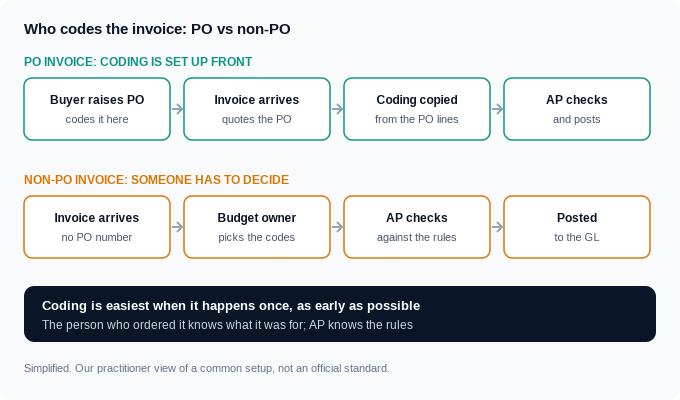
On a PO invoice, the coding is decided when the purchase order is raised, and the invoice simply inherits it. That is one of the quiet benefits of POs, covered in our guide to purchase orders vs invoices.
On a non-PO invoice, someone has to decide. In our practitioner view, the budget owner should pick the codes and AP should check them against the rules, rather than AP guessing [guessing is how boxes end up marked "misc"].
How to code an invoice, step by step
Coding sounds complicated, mostly because accountants named it. The steps are simple [the hard part is doing them the same way every time].
Read the invoice line by line
Supplier, PO number, each line's description and amount, and tax.
Check for a PO
If there is one, take the coding from the PO lines and match the invoice to it.
No PO? Ask the budget owner
They confirm what it was for, and which department or project pays.
Pick the GL account
Use the chart of accounts, and your capitalization policy for larger purchases.
Add the other codes
Department, project, location or fund, as your business requires.
Keep the invoice with the entry
The invoice is the evidence for the coding, so keep them together.
Step 6 is not just tidiness. The IRS says supporting documents such as invoices "support the entries in your books and on your tax return" [the auditor will ask, and "it is somewhere" is not an answer].
Splitting one invoice across codes
Some invoices cover costs for several departments or projects, like one box holding the kettle and the bath towels. You split the amount across codes, line by line or by an agreed percentage [label both rooms on the box, please].
If you receive federal grants, splitting is not optional. The Uniform Guidance says that when a cost benefits two or more projects in proportions you can work out, "the cost must be allocated to the projects based on the proportional benefit". Write down how you calculated the split, because someone will ask.
Coding errors and how to fix them
Miscoding is easy and very normal [a box of plates in the bathroom is still a box of plates]. The common ones are predictable.
| Error | What goes wrong | How to prevent it |
|---|---|---|
| Wrong GL account | Costs show up in the wrong line of your reports | A short list of allowed accounts per supplier |
| Wrong department or project | Budgets look wrong, managers get the wrong bills | Budget owner confirms non-PO coding |
| Expensed instead of capitalized | Profit and assets are both misstated | A written capitalization threshold |
| Not split | One department carries a shared cost | Split rules for shared suppliers |
| Coded from the wrong data | A misread amount or supplier is coded perfectly, and still wrong | Check captured data before coding |
Caught it after posting? Do not edit the original entry. Make a correcting entry, often called a reclass, that moves the cost to the right account, with a short note on why and who approved it [carry the box to the right room, and leave a note for the next person].
Why the fuss? The GAO's internal control standard covers the whole life of a transaction, "from its initiation and authorization through its final classification in summary records". Coding is that final classification. Our guide to accounts payable internal controls covers the checks that sit around it.
How to make invoice coding faster
Coding is still a manual step in many AP teams, and most of the speed comes from deciding things once [the moving company that labels as it packs finishes first].
| Fix | Why it helps |
|---|---|
| Raise more POs | Every PO invoice arrives pre-coded |
| Default coding per supplier | The cleaning company is always cleaning, so default it and let people override |
| Keep the chart of accounts short | Fewer, clearer accounts mean fewer wrong picks |
| Start from clean invoice data | Coding rules need the right supplier, PO number and line items to work |
| Count reclasses each month | If one account keeps getting fixed, the rule is wrong, not the people |
Fewer coding questions also means fewer exceptions. Ardent Partners puts the average AP invoice exception rate at 18.4%, and says exceptions are "typically the biggest single reason" processing costs are not lower. Our guide to touchless invoice processing covers the rest.
How ECIT Digital helps
We read what is inside every box, so your coding rules have something reliable to work with [we cannot find your kettle, sorry].

- Every line, not just the total. Our AI reads the supplier, PO number, line items and tax from every invoice, whether it arrives as PDF or paper.
- Checked by people. Our team reviews what the AI is unsure about, with 99.8% accuracy guaranteed.
- Into your system. We deliver the data into your ERP or AP tool by API, where your coding rules and approvals run.
See how it works on our invoice processing services and PDF to electronic invoice pages.
Want to see how ready your invoice process is today? Run the free invoice health check: it scores your invoice process in about 3 minutes and estimates what you could save, based on your own numbers.
Clean data, then coding
Every invoice line read and checked, delivered into your ERP
AI capture plus human validation, with 99.8% accuracy guaranteed. You pay per document, with no license.
So: label the boxes once, label them well, and fix the wrong ones openly. Your general ledger will thank you, and so will whoever has to find the kettle [it was in "misc", obviously].
Sondre Bratlandsmo
November 23, 2026
Book free live demo
Learn how the ECIT Digital solutions can help you with the help from one of our experts.


Frequently asked questions
Invoice coding means assigning each line of a supplier invoice to the right general ledger account, plus any other codes the business tracks, such as department, project, location or fund. The coding decides where the cost appears in the books and in management reports.
GL coding is assigning a transaction to an account in the general ledger, using the codes in the chart of accounts. In accounts payable it is the account part of invoice coding; invoice coding also covers the other codes, such as department or project.
On a purchase order invoice, the coding is usually set when the PO is raised and copied to the invoice. On a non-PO invoice, the budget owner who ordered the goods or services usually knows what it was for, so they supply the coding and accounts payable checks it against the rules before posting.
A coding line usually contains a GL account plus the other codes the organization reports on. San José State University, for instance, requires account, fund and department on most transactions, and adds project, program or class codes where needed. Businesses often use location or cost center instead of fund.
Do not edit the original entry after it is posted. Make a correcting entry, often called a reclass, that moves the cost to the right account or code, and record why it was changed and who approved it. If the same account keeps needing fixes, change the coding rule.
Raise purchase orders where possible so invoices arrive pre-coded, set default coding for regular suppliers, keep the chart of accounts short, and start from accurately captured invoice data, including supplier, PO number and line items. Counting reclasses each month shows which rules need fixing.
Relevant articles
Touchless Invoice Processing: What It Means, How to Measure It, and What Stays Human
E-Invoicing in Europe: Country Mandates and What They Mean for UK Businesses